

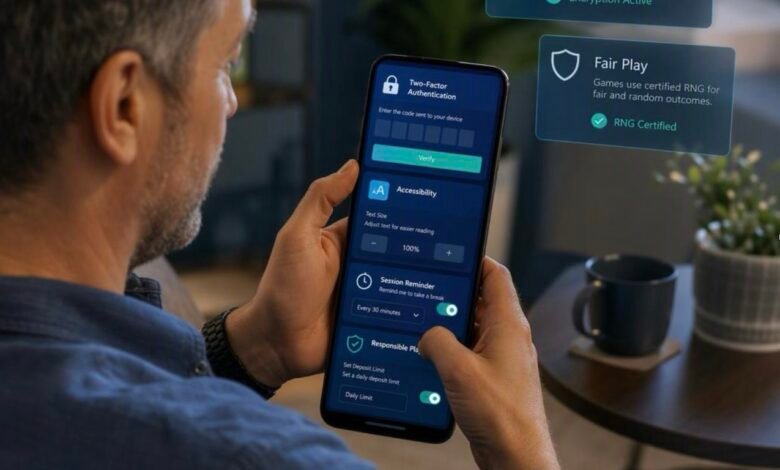
Online game platforms have changed a great deal from the clunky websites many of us remember. They’re now mobile-first technology products, built around the reality that people often browse, sign in and play from a phone rather than a desktop computer.
That shift has raised the bar. A platform needs to feel quick and straightforward, but it must also protect personal information, explain how its games work and give people practical controls over their experience. None of those things should be an afterthought.
The strongest platforms make the complicated bits feel simple. You might only notice this when something goes wrong, such as a confusing payment screen, a tiny button that’s impossible to tap or an account setting buried beneath several menus. Good design avoids those frustrations before they arise.
Mobile UX is about making the small screen feel natural
A mobile screen leaves little room for clutter. That makes user experience, often shortened to UX, especially important.

A well-designed game platform will usually load the essentials first: account access, game categories, search and support. It won’t make you hunt for basic information, and it should adapt sensibly whether you’re using a smaller handset, a larger phone or a tablet.
A few signs of thoughtful mobile UX include:
- Fast, stable pages that don’t keep jumping about as content appears
- Touch-friendly buttons with enough space between them
- Clear navigation that keeps key sections within easy reach
- Responsive lobbies where game lists, filters and information panels work across screen sizes
- Low-friction sign-in, without sacrificing proper account checks
- Useful error messages that say what has happened and what you can do next
It sounds obvious, but a tidy layout does more than look smart. It helps people understand where they are and what they’re agreeing to. Terms, limits and account controls are much more useful when they’re visible and readable.
Convenience also needs sensible boundaries. Features such as saved logins can be handy on a personal device, but shared devices call for extra care. Logging out when you’re finished, using a device lock and avoiding public Wi-Fi for sensitive account activity are simple habits that still matter.
Account and payment protection should be easy to understand
Behind a smooth sign-in screen sits a set of security systems working to protect an account. The exact setup differs from one operator to another, but there are a few practical things worth looking for.
Authentication is the starting point. A unique, long password is far safer than reusing one you already use elsewhere. Where available, multi-factor authentication adds another check, such as a code from an authenticator app or a confirmation on your device.
For payments, reputable platforms use encrypted connections. You can check for https in the web address and the padlock symbol in your browser, although those are starting points rather than guarantees that every part of a site is trustworthy.
It’s also sensible to review privacy settings. These may cover marketing preferences, contact methods and how account data is handled. A clear privacy notice should explain what information is collected, why it is used and how you can contact the organisation with questions.
Scam awareness is just as important as the technology itself. Be wary of unexpected messages asking you to sign in through a link, disclose a password or share a security code. Genuine support teams should not ask for your full password.
A quick safety routine can go a long way:
- Type the platform’s web address yourself or use a trusted bookmark.
- Use a password manager to create and store unique passwords.
- Check account activity and payment history from time to time.
- Contact customer support through the official site if anything looks unfamiliar.
- Keep your phone, browser and security software updated.
For general online safety guidance, the UK’s National Cyber Security Centre offers advice on avoiding phishing.
Fairness systems, explained without the jargon
When a digital game involves random outcomes, the phrase you’ll often hear is RNG, short for random number generator.
In plain English, an RNG is a software system designed to produce outcomes that cannot be predicted by the player. Depending on the game, it may determine things like the order of numbers, cards or symbols. Random-number systems are widely used in computing, and their purpose in games is to make individual outcomes unpredictable rather than based on a pattern a person can spot.
That doesn’t mean you should take fairness claims on trust alone. Clear information matters.
A responsible regulated operator should make it straightforward to find:
- the game rules;
- how outcomes are determined;
- relevant probabilities or return-to-player information where applicable;
- any independent testing or audit information;
- the date and version of rules if they have changed.
Independent testing laboratories can assess whether a game’s random-number process performs as intended over a large number of rounds. This is different from saying any one session will follow a particular pattern. Randomness can look uneven in the short term, which is exactly why transparent rules and properly tested systems are important.
If a platform makes its rules difficult to locate or uses vague language in place of explanation, that is a reason to pause and ask questions.
Accessibility is part of good entertainment design
Accessible design is often described as a specialist consideration. Really, it benefits nearly everyone.
Small text, poor contrast, fiddly controls and busy screens can make any platform tiring to use. A better approach gives people options and avoids assuming that everyone sees, hears, reads or interacts in the same way.
Useful accessibility features may include:
- adjustable text size and zoom support;
- strong colour contrast and information that isn’t conveyed by colour alone;
- labels that work with screen readers;
- clear keyboard navigation for those using a desktop or assistive technology;
- captions or written alternatives where audio is important;
- simple language around account actions and game rules;
- layouts that remain usable in portrait and landscape modes.
Device compatibility matters too. A platform that works beautifully on one recent handset but struggles on an older browser is not as accessible as it could be. No site will be perfect for every combination of device and assistive technology, but it should be open about supported systems and continue improving.
Account-control tools should be easy to find and clearly explained.
A good platform gives users room to make deliberate choices about their time, notifications and account activity.
Notification settings are an easy example. Some people want updates; others prefer fewer prompts on their lock screen or in their inbox. The controls should be easy to find and easy to change.
Session reminders can also be useful. They provide a clear marker of elapsed time, particularly when you’re using a phone and dipping in and out of an app during the day. Account limits, time-outs and self-exclusion options are other tools that regulated gambling platforms may provide.
The key point is visibility. Tools intended to support responsible use should not be hidden in a maze of settings or described in confusing language. They should be available before there is a problem, with clear explanations of what each option does and when it takes effect.
For UK gambling services, the Gambling Commission’s consumer information is a useful starting point for understanding regulation and available protections.
Contextual example: how these principles appear in online bingo
Online bingo is one regulated digital-entertainment use case where mobile UX, account protection, fairness information, accessibility and player-control tools all meet in one place.
At the front end, a bingo lobby should make it easy to browse formats, understand scheduled sessions and read the rules on a phone without endless scrolling. The same principles apply to account access and payments: clear sign-in steps, protected transactions and a visible route to support if something does not look right.
Fairness information should explain how numbers are generated and how the game works. It is also worth checking that the platform provides readable terms, accessible interface options and practical controls such as notification preferences, session reminders or account limits where relevant.
If you’re simply looking to understand the variety of formats available, this overview of Jackpotjoy’s online bingo games is an example of browsing game types before choosing whether to take part.
In the UK, participation in gambling is for adults aged 18 and over and should always be approached responsibly. Take time to read the rules, use available controls and step away if the activity no longer feels right for you.
A short checklist before you use a platform
Before creating an account, ask yourself:
- Is the operator properly licensed for where I live?
- Can I find the privacy policy, game rules and support details easily?
- Does the site use secure connections and offer robust account protection?
- Are responsible-use controls clearly available?
- Does the platform work comfortably on my device and with my preferred settings?
- Would I know how to contact support or report a concern?
Modern platforms don’t have to choose between being pleasant to use and being protective. The better ones recognise that speed, clarity, security, accessibility and responsible-use features all belong in the same experience.


Join the discussion