

Insights At a Glance:
- Google Photos is 10. To celebrate, Google dropped 10 tips and tricks to help you edit, search, and share your memories like a pro.
- From QR code albums for your next sherehe to smart edits of your Karura pics, these features actually make life easier.
- Whether you’re in Nairobi, Kisumu, or Coast, these tips are perfect for organizing, reliving, and sharing your Kenyan moments.
Google Photos just turned the big 1-0, and honestly, it feels like we’ve grown up together. If you’ve been backing up your memories since that trip to Diani in 2016, or saving those endless selfies at Java House before Instagram filters even got good, then you’re part of the journey too. To mark a decade of helping us remember what we wore, where we went, and who we were with, Google has dropped 10 fresh tips and tricks that every Google Photos lover will want to try out.
Let’s break it down:
1. Edit with Ease Using the Redesigned Editor
Google’s new AI-powered editor is a game-changer. It’s rolling out to Android next month (iOS later this year), and I can’t wait to play with it. The redesigned layout puts all tools—brightness, contrast, and cool AI stuff like Reimagine and Auto frame—in one spot. Say you snapped a slightly blurry pic of your cousin dancing at a wedding in Kiambu. With the new AI suggestions, you can unblur her moves, tweak the lighting to highlight her vibrant kitenge dress, and even reimagine the background to add a Nairobi skyline vibe.
Notably, features like Reimagine and Auto Frame (shout-out to Pixel 9 users) are expanding—meaning soon, your Ngong Hills sunset shots will never look the same.

2. Share Albums Instantly with QR Codes
Sharing Google Photos albums just got slicker with QR codes. This feature’s rolling out now, and it’s perfect for Kenya’s group vibes. I’ve yet to receive the feature, but I can already picture myself at a friend’s baby shower creating a shared album, generate a QR code, and boom—guests scan it with their phones to view and add pics of the cake-cutting and laughter. Now, imagine using this at a Mombasa beach party or a graduation in Juja—everyone jumps in, adding their shots instantly. No more “send me the pics” texts lagging for days.
3. Revisit the Places You’ve Been
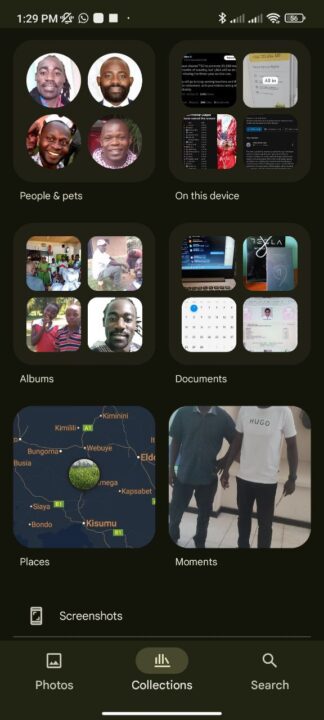
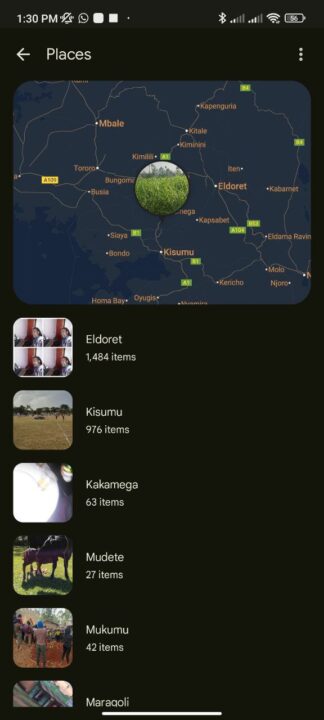
The “Places” tab under collections is my time machine. Google Photos pins your pics on an interactive map. All you need is to tap in and relive your 2023 road trip—snaps of zebras in Amboseli, coffee farms in Nyeri, and the stunning Lamu sunset. It’s a fun way to trace your adventures across our beautiful country.
4. Get Specific with Your Searches
Searching in Google Photos is like magic—no perfect keywords needed. For instance, I named faces in “People & Pets” (me, my cousin Collins (Collo), my brother Paul, etc.), and now I search “me and Collo in Vihiga” or “me and Paul in Kisumu.” You can also exclude the location if you see fit. Results pop up fast! You can try “me in a red shuka at the Maasai market” or “Juma at Watamu beach”—perfect for finding that exact moment from Kenya’s vibrant scenes.


5. Enjoy a Look Back at Your Month or Year
Google Photos auto-crafts “Best of Month” and “Year End Recap” memories, and I’m hooked. Last month, it whipped up a montage of my visit to the Eldoret fresh produce market—pineapples, watermelons, and tomatoes. The year-end recap brought back my 2024 highlights: a family reunion in Vihiga and a fish-eating fiesta at Dunga Beach in Kisumu. You can even share these with your friends to relive your hikes, festivals, or coastal getaways with nostalgia on tap.
6. Create a Personal Montage to Share
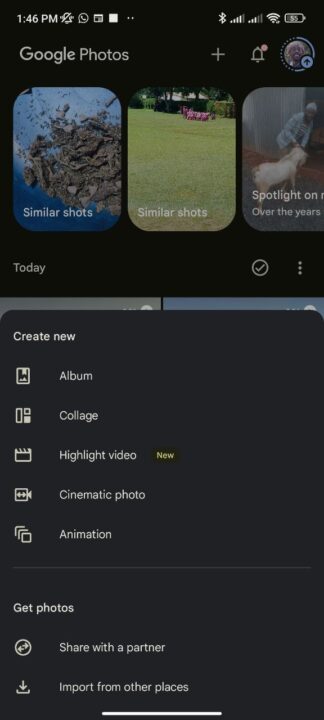
Speaking of sharing, just hit the “+” button, pick “highlight video,” and let Google Photos work its magic. You can choose pics of you, your pals, and your Mombasa trip—waves crashing, seafood feasts—and it’ll stitch them into a short video with upbeat music perfect for WhatsApp or Instagram stories to wow your friends and followers on social media.
7. Stay Close with Shared Albums
Long-distance? No problem. You can set up a shared album for your mum in Kisii, auto-add pics of your kid’s birthday and your Nairobi life. Updates will roll into her app without her lifting a finger. It’s like bringing her along to your daily adventures. It keeps everyone connected, Coast to Rift Valley.
8. Personalize Your Grid
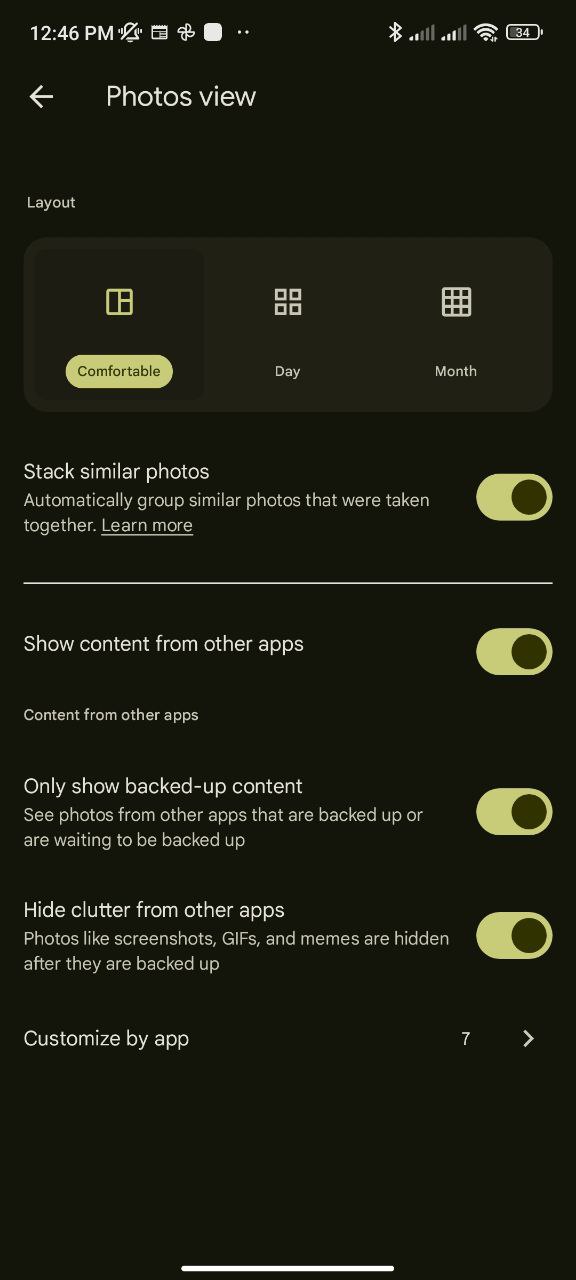
My photo grid was a mess—screenshots, memes, and random WhatsApp pics everywhere. With grid controls (tap the three-dot icon), I’ve managed to stack similar shots from a Nairobi concert and hid old screenshots. Now my feed’s clean, spotlighting my best moments. You can declutter your gallery too—stack those similar selfies from a night out in Westlands or hide GIFs from group chats. You can even customize per app as you see fit.
9. Choose Your Memories
Memories are great, but sometimes you need control. In Settings > Preferences > Memories, I’ve hidden pics of an old trip I’d rather forget and focused on fun stuff like my favorite cousin’s graduation in Mombasa. You can tweak yours too—hide specific people, pets, or dates, and pick themed or time-based memories. Perfect for curating your highlights, from cultural festivals to quiet lake days.
10. Free Up Space on Your Device
Running low on internal phone storage? Tap your profile pic, hit “Free up space on this device,” and Google Photos removes backed-up pics. For some, this is a lifesaver—snap all the mandazi-making or boda boda rides you want, then free up room safely after everything gets backed up on Google Photos.
A Decade of Memories
Google Photos, with 1.5 billion monthly users and 9 trillion photos stored, has been my memory buddy for years. From storing childhood snaps of my little niece to curating albums from tech events in Nairobi, it’s my visual diary—and I know many of you in Kenya and across Africa love it too. Be it the new AI-powered edits and QR code sharing or even sharing albums with friends and family, these 10 tips make reliving, tweaking, and sharing our moments a breeze. As Google pushes AI boundaries, I’m excited for what’s next—more ways to capture Kenya’s vibrant life, from Nairobi’s bustle to upcountry’s calm.
Happy 10th anniversary, Google Photos, and here’s to more memories.







Join the discussion