
Update (Sep. 25): Android users are now receiving this iOS 26-inspired upgrade in the stable channel. Here’s a summary of the official changelog Apple shared in the Google Play Store:
What’s new
This update includes:
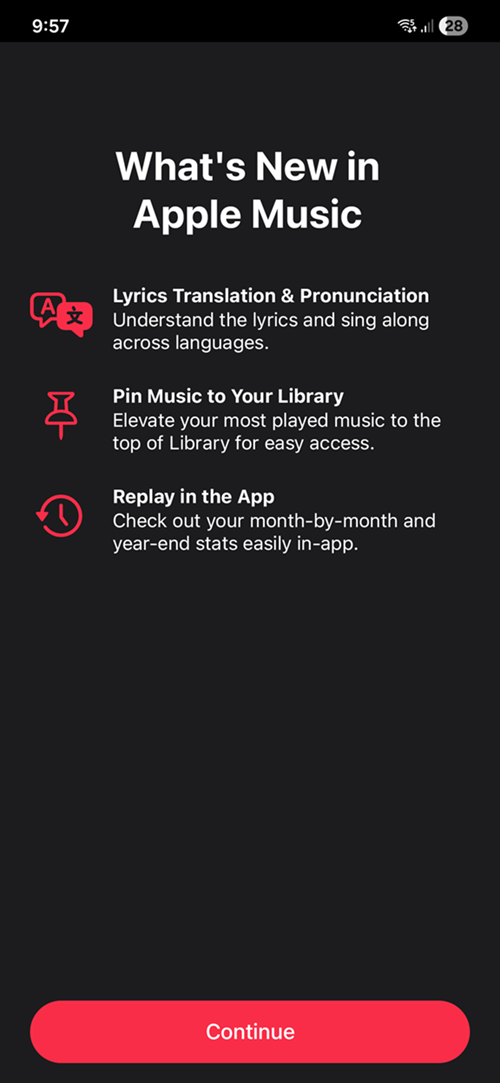
• Lyrics Translation & Pronunciation: Understand the lyrics and sing along across languages.
• Library Pinning: Elevate your most-loved music to the top of Library for easy access.
• Replay in the App: Check out your month-by-month and year-end stats easily in-app.
• Various app and performance improvements.
Original article follows:
I’m an Android guy. Always have been, always will be. Yes, I’ve owned iPhones—but they were never my daily drivers. I got them purely out of curiosity, as a tech writer, just to see what Apple’s walled garden felt like. To tinker. To explore. To better understand what all the fuss was about.

And one thing I took from that iOS experience, which I just couldn’t let go of, was Apple Music.
I’ll be the first to admit: Spotify is the better platform overall. It’s smarter, more feature-packed, and better at recommendations owing to the massive catalogue of music and podcasts. But something about Apple Music; the clean interface, tight album organization, and lossless audio, just feels better. So even after tossing the last iPhone XS I had after it maxed out at iOS 18, I kept Apple Music on my Android.
But for the longest time, we Android users have been second-class citizens in Apple’s music ecosystem, up to and including the recent iOS 26 beta release.
Until now.
Apple Music 5.0 Beta on Android = iOS 26 Taste Test
Apple has just rolled out the Apple Music 5.0 beta for Android, and for once, we’re not being left behind. The update brings some long-overdue feature parity with the upcoming iOS 26 release, and I’m here for it.
No, we still don’t get the sleek Liquid Glass redesign with the floating Now Playing controls and aesthetic bliss iPhone users enjoy. The bottom bar remains the same, and sure, it stings a little. But what we do get is a solid handful of new features and visual tweaks that make Apple Music feel more modern. When you first update to the beta, you’ll see a splash screen highlighting some new features that, until now, were only teased in iOS 26 land:
Pill-shaped Buttons Everywhere
One of the first things you’ll notice is the UI refresh. Gone are the old rounded rectangles, replaced with pill-shaped buttons throughout the app.
- The Shuffle, Repeat, and Autoplay icons at the top of the queue? Updated.
- The Play and Shuffle buttons on albums? Same smooth treatment.
It’s a small visual change, but it instantly gives the app a cleaner, more fluid look that aligns more with Apple’s latest design philosophy.
Lyrics Translation + Replay: More iOS 26 Goodies Arrive
- Lyrics Translation & Pronunciation: You can now sing along to foreign tracks with confidence (and way less embarrassment). Whether you’re into K-pop, Afrobeat, or reggaetón, Apple Music helps you understand what you’re actually belting out.
- Replay in the App: No more jumping through hoops to see your listening stats. The app now shows month-by-month and year-end Replay data, right where it belongs.
You Can Now Pin Music in Your Library—And It’s Magical
The real MVP of this update is a new feature that honestly should’ve existed years ago: Pinning music in your Library. You can now pin your:
- Favorite Songs
- Beloved Albums
- Go-to Playlists
- Ride-or-die Artists
Straight to the top of your Library for quick access. Just head to the overflow menus (those three dots), and you’ll see the new Pin option. This syncs across your devices as long as you’re using the same Apple ID. Once pinned, you can long-press to:
- Unpin
- Customize Tap Action (Go to Album, Play, or Shuffle)
- Auto-download pinned items (or not, if you’re saving data)
For anyone with a big library or highly specific listening habits, this is game-changing.
Want In? Join the Beta Now
If you’re curious and want to dive into this iOS-Android crossover experience, all you need to do is sign up for the beta program on the Google Play Store:
Join the Apple Music beta here
Keep in mind it’s a beta. There may be the occasional bug or hiccup, but if you’re the kind who likes living on the edge, you’ll want to be among the first to enjoy these long-overdue features.





Join the discussion