
Spotify’s long-teased Lossless audio feature is finally official, and if you’re a Premium subscriber, you’ll soon get a chance to try it yourself. While Kenya hasn’t made the first wave of countries, the feature is expected to roll out more widely in October.
Here’s exactly how you’ll turn it on when it hits your account:
Step 1: Update Your Spotify App
Make sure your app is on the latest version. Lossless support will only appear if you’re fully updated, whether on mobile, desktop, or tablet.
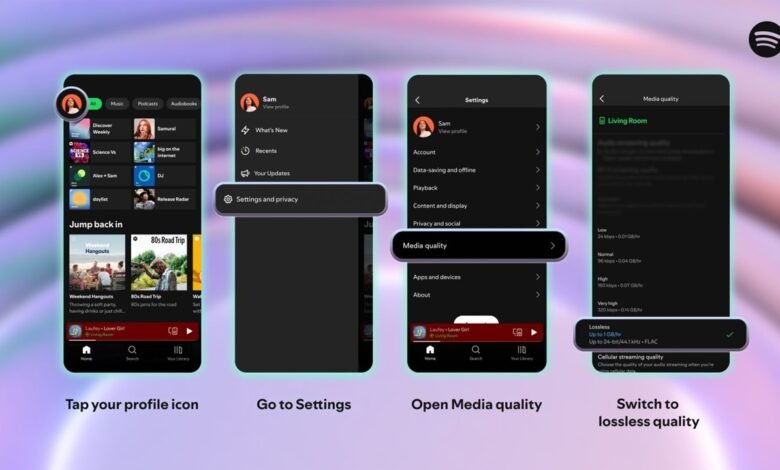
Step 2: Go to Settings
- Open Spotify.
- Tap your profile picture in the top-left corner.
- Navigate to Settings & Privacy → Media Quality.
Step 3: Enable Lossless for Each Connection
Spotify gives you separate options depending on how you listen. You’ll see settings for:

- Wi-Fi
- Cellular Data
- Downloads
Under each, choose Lossless. (You can still pick Low, Normal, High, or Very High if you want to save data.)
Step 4: Look for the Lossless Badge
Once enabled, you’ll know you’re in Lossless mode when:
- A Lossless indicator appears in the Now Playing view.
- Or in the Connect Picker when you’re streaming to a device.
Step 5: For the Best Results, Use Wired Headphones or Spotify Connect
Spotify warns that Bluetooth isn’t yet capable of handling true lossless audio. The signal gets compressed before hitting your wireless earbuds. For the richest detail:
- Plug in wired headphones or a good DAC.
- Or use a supported speaker/receiver through Spotify Connect.
Step 6: Be Patient When Loading Songs
Lossless files are bigger than normal ones. That means tracks may take an extra second to load, especially on slower networks. But once they’re cached, playback will be smooth.
Notably, lossless isn’t available here just yet. But once Spotify flips the switch, you’ll get a notification in your app. So keep your app updated, and check your Media Quality settings every now and then.
Because when it lands, this could finally make Spotify sound as good as or even better than Apple Music.







Join the discussion