
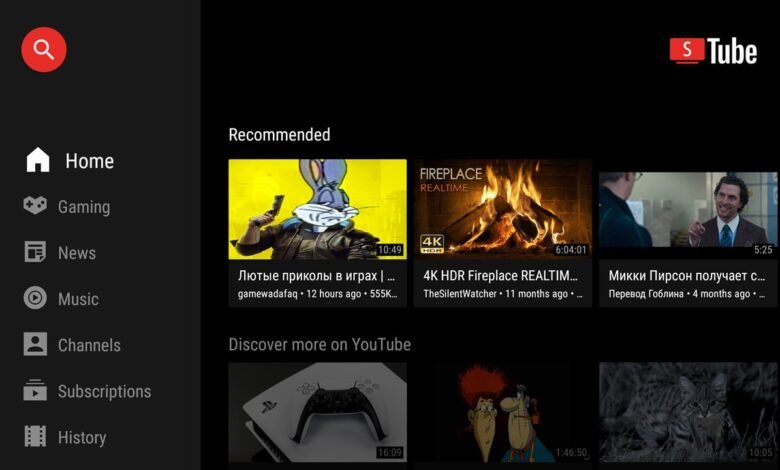

SmartTube, arguably the most popular third-party YouTube client for Android TV, has suddenly been disabled across multiple TV devices, after Google Play Protect flagged the app. The move has sparked confusion among users, but the developer has since confirmed there’s a real security reason behind the widespread block.
Over the past few days, some Android TV owners began reporting that Google Play Protect was outright disabling SmartTube on their devices. The issue has surfaced on a wide range of products, including the NVIDIA Shield TV, Walmart Onn streaming boxes, Sony Bravia TVs, TCL Google TVs, and more. Even Amazon Fire OS devices, which rely on a modified Android base, appear to have blocked the app.
Interestingly, SmartTube continues to work on my Chromecast with Google TV unit. But that may vary depending on Play Protect settings. I’ve disabled the settings on my unit in order to run a bunch of apps from “Unknown sources” without Play Protect swooping in to disable them, so this might be why I still have SmartTube working fine on my unit.
Why Google actually blocked SmartTube
Unlike previous Play Protect mishaps, this time it’s not a false positive. SmartTube developer yuliskov confirmed on GitHub that their digital signing key was exposed, the cryptographic stamp that ensures updates come from a trusted, verified source.
"This signature protects the app from fake and malicious updates, so there is a risk that someone may try to release counterfeit versions under my name," the developer explained.Because of this, the developer has decided to stop using the compromised signature, adopt a new signing key, and as a result, release a new app with a different app identifier. That means future updates won’t arrive via the current SmartTube installation.
From the official announcement:
"You don’t need to delete the old app (but it will no longer receive updates) — the new one will install as a separate app and will need to be configured again."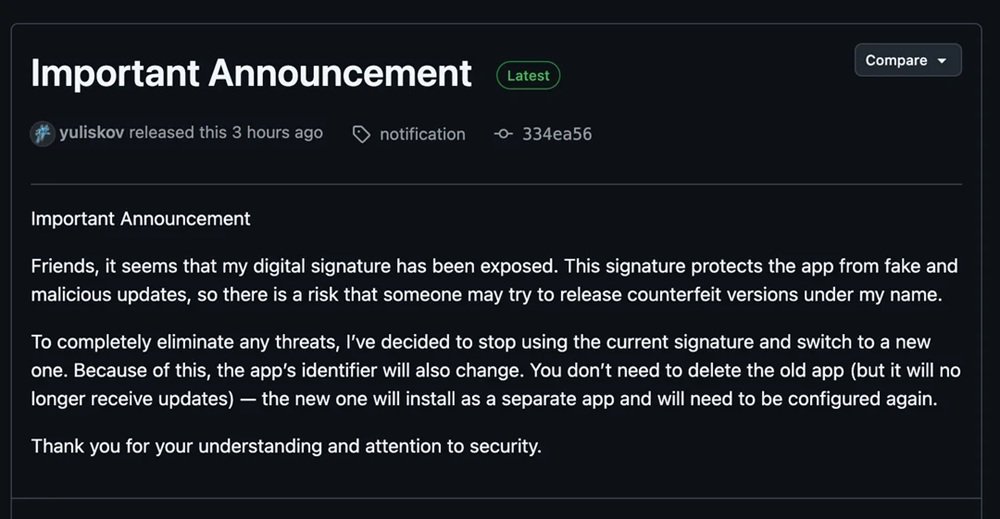
What users should (and shouldn’t) do right now
Until the new SmartTube version is released, affected users technically have a few workarounds, such as:
- disabling Google Play Protect
- disabling automatic app updates
- reinstalling SmartTube manually (APK sideload)
But these approaches bypass core Android security features and come with obvious risks, especially now that a compromised signing key could allow maliciously modified versions to circulate.
The safer option is clear: leave Play Protect enabled and wait for the developer’s new app to drop. Given SmartTube’s history of frequent updates, this may not be a long wait.
SmartTube isn’t gone
The good news is that SmartTube isn’t being killed off. The existing app still runs on many devices for now (unless Play Protect removes it), and the developer is already working on the replacement version.
SmartTube remains incredibly valuable to Android TV users thanks to features the official YouTube app either hides or simply doesn’t offer, such as:
- SponsorBlock integration
- live chat support
- picture-in-picture mode
- advanced video quality controls
- full functionality on devices without Google services
- ad-free viewing, depending on features used
For a lot of users, it’s genuinely the better YouTube experience.
A reminder that Google is getting serious about Android TV security
This incident also highlights something important: Google Play Protect is actively monitoring Android TV and enforcing signing-key integrity, even if it means temporarily cutting off access to popular apps. Given the rise of sideloaded apps and alternative TV app stores, that’s a meaningful security signal.
For now, SmartTube fans will need to be patient. Once the developer releases the new properly-signed version, it should restore full functionality and hopefully without Play Protect stepping in again.
We’ll be keeping a close eye on developments and will update you as soon as the new SmartTube app becomes available.






On my V14 device “Unknown Sources” is no longer an option and has been replaced by “Scan apps with Play Protect”. But older V9 devices have retained the “Unknown Sources” option. This doesn’t bode well for sideloading going forward.
Interesting. I’m running the latest October build based on Android 14, and I’ve just sideloaded an an app for tesing purposes. It worked fine.
As for “Scan apps with Play Protect,” I’ve turned it off since I have some less appopriate apps installed on my Chromecast that have been flagged by Play Protect before. Also, Unknown sources isn’t a setting on its own in the Chromecast settings, at least AFAIK. Once you enable developer options, it gets triggered automatically when installing APKs, prompting you to toggle.
Unknown sources was available as an option once developer options was activated on Chromecast for previous builds, you still had to enable it as it was disabled by default. But this option on the menu has now changed to “Scan apps with Play Protect”. For now it seem we are safe with our side loads leaving that disabled. Google did say they were going to block all unauthorised apps. But have backed down, and for now they are looking at implementing unknown developer lockout instead. So just have to wait and see where we end up.
Hillary, Do you still have the unknown sources option showing in your Chromecast? My existing sideloaded apps are still running, but I can’t side load any new ones.
Yes, I do, Peter. Do you still have Developer options enabled? Sometimes new software updates disable the option, so do check to confirm.