
Google is continuing its slow but deliberate effort to blur the line between desktop and mobile browsing, and the latest change in Chrome for Android is a good example of that.
Some Chrome for Android users are now seeing a new option that allows them to enable a bookmark bar, a long-standing feature on Chrome for desktop that makes bookmarked sites instantly accessible with a single tap.
A familiar desktop feature, now on Android
On desktop Chrome, the bookmark bar sits just below the address bar (omnibox), giving users quick access to their most-visited or saved websites without digging through menus. I love and use this feature every single day. But until now, Android users had no such luxury.
Traditionally, accessing bookmarks on Chrome for Android meant tapping the three-dot menu and selecting Bookmarks, a process that’s functional but far from instant — especially for users who rely heavily on saved links for work, research, or daily browsing.
That’s now starting to change.
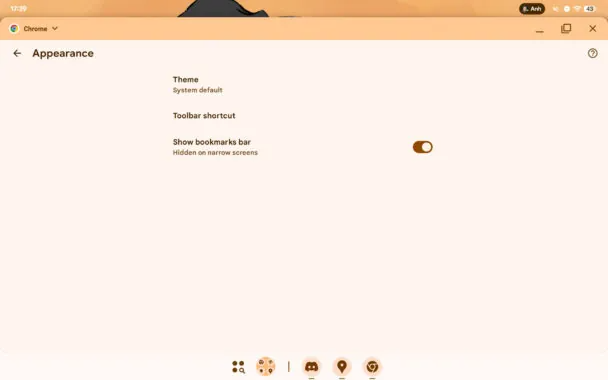
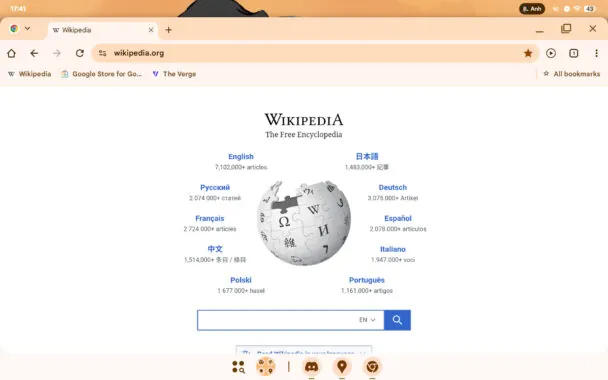
A new toggle labeled “Show bookmarks bar” has quietly appeared in Chrome for Android settings for some users. When enabled, the bookmarks bar shows up directly beneath the omnibox, mirroring the desktop Chrome layout almost exactly.
Faster access, fewer taps
The addition may seem small, but it meaningfully improves usability. With the bookmark bar enabled, frequently visited sites are always visible and just one tap away, cutting down on extra steps and making Chrome feel more like a productivity-focused browser rather than a purely mobile one.
This also aligns with Google’s broader goal of unifying the Chrome experience across platforms, especially as more users switch between phones, tablets, Chromebooks, and desktop PCs throughout the day.
However, there’s a major limitation.
The new bookmark bar option currently appears to be restricted to wide-screen Android devices, such as tablets and large foldables. Standard smartphones don’t seem to support the feature, likely due to limited vertical screen space and layout constraints.
In other words, if you’re using Chrome on a typical Android phone, you’ll still need to rely on the traditional bookmarks menu. At least for now.
Rolling out quietly, not officially announced
As with many Chrome features, Google hasn’t made any formal announcement about this change. The bookmark bar toggle appears to be rolling out gradually, possibly via a server-side update, which means availability may vary depending on device type, Chrome version, and account.
Still, its arrival suggests Google is increasingly treating Android tablets as true productivity devices, rather than oversized phones — a direction that fits well with recent improvements in Android’s large-screen experience.
For tablet users who live in their browser, this small tweak could make Chrome on Android feel a lot more like home.