If you are running Windows 11 in Kenya, you might want to wake up your laptop and take a closer look at the taskbar today. After months of waiting, silence, and watching users in other regions enjoy the new November 2025 Update features, it seems the rollout has finally hit our shores, at least partially.
As of this morning, January 9, 2026, the long-awaited colourful battery icon has arrived for local users. But in classic Microsoft fashion, the update is a mixed bag: while the new battery indicator is here, the much-hyped new Start menu UI is still nowhere to be found.
For many of us, this wasn’t a manual install. KB5068861 was technically released back in November 2025 as a mandatory update for Windows 11 versions 25H2 and 24H2. However, installing the update didn’t guarantee you got the features immediately. Microsoft has been using a server-side “controlled feature rollout,” meaning the code sits dormant on your PC until Microsoft flips a switch remotely to enable it.
That switch was seemingly flipped for Kenyan users (or at least for me) overnight.
I discovered the change this morning after waking my laptop from sleep mode—something I rarely do without a full shutdown (we’ve all been there). After a quick restart, the static white battery icon that has defined Windows for years was gone, replaced by the new, dynamic version.
Hands-on with the colourful battery icon
For a feature that sounds minor on paper, the visual impact is surprisingly refreshing. Microsoft has abandoned the monochromatic look for a system that uses colour to communicate status at a glance.
Here is how the new system works:
- Green: Your device is charging.
- Orange: Energy Saver mode is active.
- Red: Battery is critical (below 6%) or about to die.
- White: Standard usage (static).

The icon itself is physically longer on the taskbar. Microsoft designers explained last year that this added length was necessary to make the colours and levels legible without squinting.
“You can’t understand what level my battery’s at… it’s a teeny tiny icon,” a Microsoft designer previously admitted to Windows Latest, citing user feedback that the old icon was too small and vague.
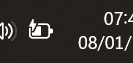
How to enable the Percentage
Along with the colours, this server-side update finally brings a native percentage indicator to the taskbar, removing the need to hover over the icon.
If you have received the update but don’t see the numbers yet, you need to toggle it manually:
- Go to Settings.
- Navigate to System > Power & battery.
- Toggle on Battery percentage.
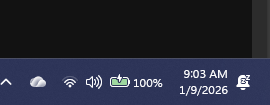
While the new battery icon is a welcome addition, it highlights a frustrating reality for Windows users in our region: we are often at the back of the queue.
KB5068861 was marketed as one of the biggest updates since the launch of Windows 11, promising not just battery icons, but a redesigned Start menu UI and significant performance boosts. Yet, nearly two months after the global release, I am only seeing one of these features. The new Start menu is still missing from my laptop, and likely yours too.
This staggered, piecemeal rollout strategy is confusing. Microsoft says features are rolled out “in the coming weeks” to ensure stability, but a two-month delay for basic UI elements raises questions about geographical prioritization. Is Africa the last region on the list for server-side triggers?
Did you get the update?
We want to gauge how widespread this rollout is in Kenya and East Africa. Did you receive the colourful battery icon back in November, or did it just pop up on your machine today like it did on mine? And more importantly, do you have the new Start menu yet?
Let us know in the comments or on our socials. For now, enjoy the splash of green and orange on your taskbar; it might be the only new thing we get for a while.