
If you thought Google’s recent crackdown on apps like Cricfy TV was annoying, Amazon just said, “Hold my beer.”
Back in November, we reported that Amazon had started blocking piracy apps from launching. At the time, it felt like a significant escalation. After all, you could install the app, but Fire TV would simply refuse to open it.
Well, Amazon has decided that wasn’t enough. In a move that makes Google’s Play Protect antics look like child’s play, Amazon is now actively blocking the installation of piracy and illegal streaming apps entirely on Android-based Fire TV devices.
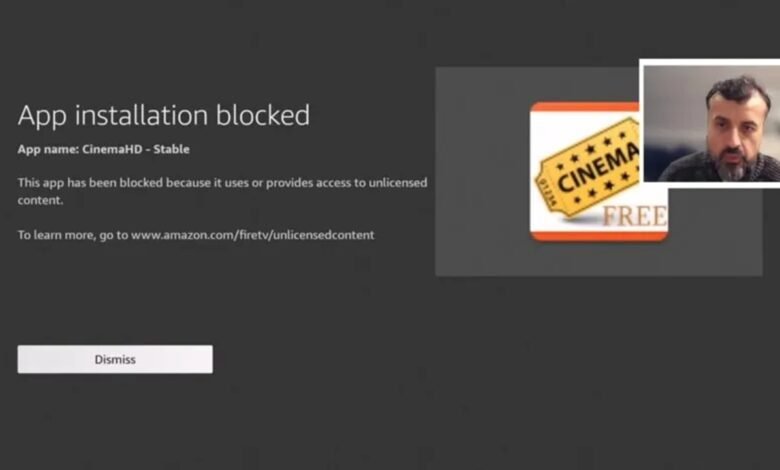
According to reports from TechDoctorUK (via AFTV News), Amazon has pushed an update to its Android-based Fire TV models that scans APKs during the installation process. If the system flags the app as a known piracy tool, the installation is killed immediately.
Users are now being greeted with a blunt warning message:
“This app has been blocked because it uses or provides access to unlicensed content.”
This is a massive shift. Previously, the cat-and-mouse game allowed you to get the app onto the device, giving developers a chance to find a loophole to launch it. Now, Amazon is locking the door before the app even enters the building.
Amazon vs. Google: A tale of two crackdowns
Just earlier this week, I wrote about Google ramping up its fight against piracy, specifically how Android TV and Google TV devices are automatically uninstalling unofficial apps like Cricfy TV, a favourite for many Kenyans streaming live football.
While frustrating, the Google situation is manageable. The “culprit” on Google TV is usually Google Play Protect, which can be disabled in settings. Once you turn it off, you can generally sideload in peace. The app will also remain installed on your TV for as long as you want.
Amazon’s approach is far more draconian. This isn’t a security scanner you can toggle off in the settings; it appears to be baked into the OS level of Fire TV updates. Whether you are using the newer Vega OS devices or the older Android-based Fire TV Stick 4K, the walls are closing in.
Is there a way around it?
For now, the sideloading community is scrambling for solutions, but it’s getting harder.
- Older/Beta versions: Some users report that older versions of blocked apps, or beta builds that haven’t yet been “blacklisted” by Amazon’s hash database, might still install.
- App cloning (the “renaming” trick): AFTV News suggests using app cloning tools on a PC to change the package name of the app. If Amazon is blocking
com.piracy.app, renaming it tocom.techish.testmight fool the system, at least for now.
If you are in the market for a streaming device and care about the freedom to sideload apps like Cricfy, OnStream, or SmartTube, Fire TV is becoming a hard recommendation.
Amazon is clearly signaling that they want total control over what runs on their hardware. For the time being, standard Google TVs or Android TV boxes (like the Xiaomi Mi Box, Onn 4K Pro, or the Chromecast with Google TV) remain the safer bet for the “unfettered” user, provided you remember to turn off Play Protect.