
Over a year after initial code commits hinted at its development, we finally have our first proper look at the upcoming built-in Task Manager for Chrome on Android. This comes weeks after Chrome for Android added a desktop-style bookmarks bar.
Bringing one of the most useful desktop features to mobile, this new tool will allow users to surgically identify and kill resource-hogging tabs without having to restart the entire browser.
The first look comes courtesy of well-known browser code sleuth @Leopeva64 on X (formerly Twitter), who shared a video and screenshots showcasing a fully functional, highly detailed interface that closely mirrors what you’d find on Chrome for Windows, Mac, or ChromeOS.
How it works
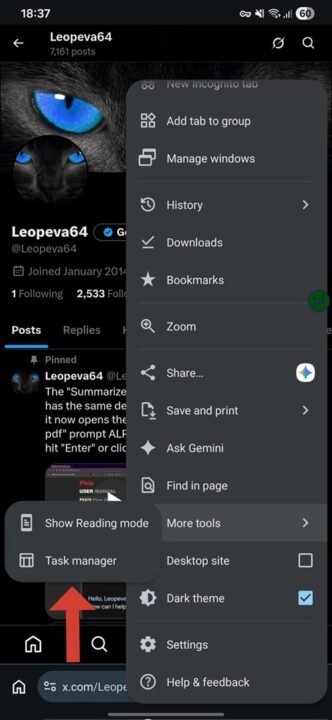
Based on the video and images, accessing the new feature will be straightforward. Users will tap the standard three-dot overflow menu in the top/bottom right corner, navigate to More tools, and select Task manager.
Once launched, the Task Manager opens a dedicated window displaying a comprehensive list of all active browser processes. This includes individual open tabs as well as background services.
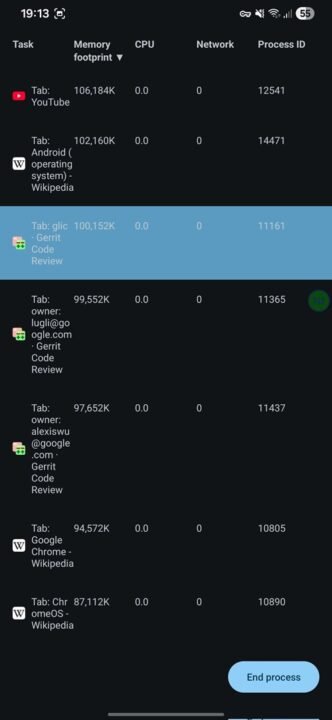
Alongside each task, Chrome provides real-time metrics broken down into four distinct columns:
- Memory footprint: How much RAM a specific tab is consuming.
- CPU: The percentage of processing power being used.
- Network: Active data usage.
- Process ID: The unique system identifier for the task.
Just like its desktop counterpart, the Android Task Manager is fully interactive. You can tap on any of the column headers at the top to sort the list in ascending or descending order. If you spot a rogue tab or a crashed webpage that is slowing down your device, you simply tap to select it and hit the prominent, pill-shaped End process button at the bottom right of the screen to kill it instantly.
For users in markets like Kenya where budget sub-KES 10,000 and sub-KES 20,000 Android smartphones with limited RAM are incredibly popular, this is a massive quality-of-life update. This built-in Task Manager gives users granular control to troubleshoot and manage their browser’s performance on the fly.
While there is no official word from Google on exactly when this feature will roll out to the stable channel, the highly polished UI in the video and screenshots suggests that broader testing is well underway.