
A screenshot shared on X (formerly Twitter) has reignited a long-running debate about the technical foundations of Kenya’s banking infrastructure, and the results, for at least one major institution, are hard to ignore.
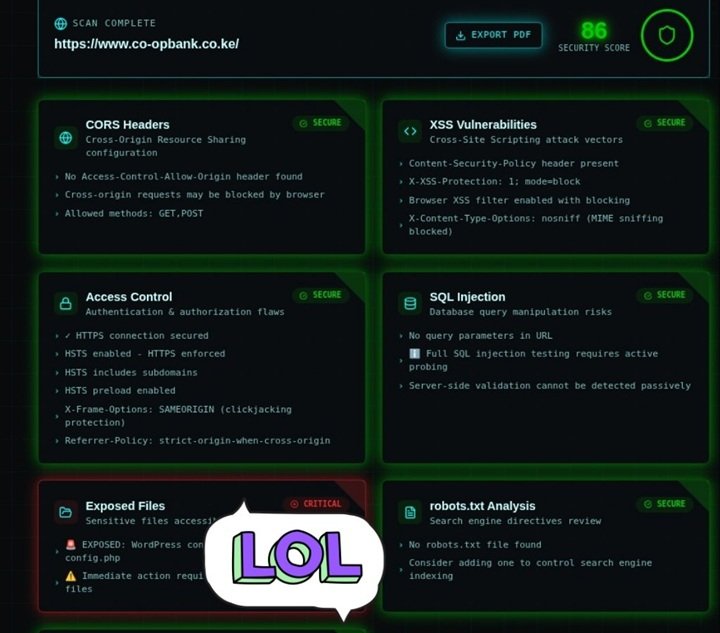
The post, which has been making rounds among Kenya’s tech community, shows the results of an automated security scan run against https://www.co-opbank.co.ke/, the public-facing website of Co-operative Bank of Kenya. The scan returned an overall Security Score of 86/100, respectable on the surface, but hiding a finding that security professionals would flag as deeply troubling.
The good news first
To be fair, the scan surfaces several things the bank is doing right. Their XSS (Cross-Site Scripting) protections are in order: a Content Security Policy is present, the X-XSS-Protection header is active, and MIME-type sniffing is blocked. These are standard defenses against attackers injecting malicious scripts into web pages.
Access Control also passes with flying colours. The site enforces HTTPS, has HSTS (HTTP Strict Transport Security) enabled and extended to subdomains, uses HSTS preloading, and has clickjacking protection via the X-Frame-Options: SAMEORIGIN header. This means users connecting to the site are doing so over an encrypted, verified connection. This is a basic but essential security requirement for any financial institution.
CORS Headers and SQL Injection checks come back largely clean, and robots.txt raises only a minor advisory: the file doesn’t exist, meaning the bank isn’t actively controlling what search engines index on their domain.
Then comes the critical finding
Buried at the bottom of the scan and partially obscured by a “LOL” sticker in the screenshot is a result flagged in bright red: CRITICAL. The category? Exposed Files. The finding? An exposed WordPress configuration file — config.php.
This is not a minor misconfiguration. The WordPress wp-config.php file is arguably the single most sensitive file in any WordPress installation. It contains:
- Database host, name, username, and password — the keys to the site’s entire backend database
- Secret authentication keys and salts — cryptographic values used to secure user sessions and cookies
- Database table prefix — which helps attackers map the structure of the database
- Debugging settings — which, if enabled, can leak server path information
If this file is publicly accessible, an attacker does not need to “hack” anything in the traditional sense. They simply navigate to it and read the credentials in plain text. From there, direct database access or, at minimum, a complete compromise of the website’s admin functions becomes a realistic possibility.
The scan note visible in the screenshot reads: “Immediate action required…” before the text is cut off.
The bigger conversation: WordPress in banking
What makes this finding particularly striking is the context in which it was shared. The person who posted it made a pointed observation: a significant number of Kenyan institutional websites, including those in the financial sector, appear to be built on WordPress, the world’s most popular content management system, originally designed for blogs and marketing websites.
WordPress is not inherently insecure. Maintained correctly, with proper configuration, regular updates, and hardened server settings, it can serve as a reasonable platform for a public-facing informational website. However, it requires active, ongoing management, and critically, it is only as secure as its configuration.
Leaving wp-config.php exposed is a well-known, well-documented vulnerability. It is the kind of mistake that security checklists, WordPress hardening guides, and web application firewalls are specifically designed to catch and prevent. The fact that an automated scanning tool was able to surface it suggests the site had not been audited with even basic security hygiene in mind.
For Co-operative Bank and any institution in a similar position, the immediate remediation steps are straightforward:
- Restrict access to
wp-config.phpvia server configuration. - Rotate all database credentials immediately, on the assumption that they may have already been read.
- Audit server file permissions to ensure no other sensitive files are publicly accessible.
- Add a
robots.txtfile to control search engine indexing. - Commission a full penetration test, not just a passive automated scan, to identify vulnerabilities that passive tools cannot detect, such as SQL injection vectors and authentication flaws.
The post reflects a frustration that Kenya’s cybersecurity community has voiced for years: that institutions handling sensitive financial data are sometimes deploying web infrastructure without the rigorous security oversight that the stakes demand. A security score of 86 sounds reassuring until one of the remaining 14 points turns out to be your database password sitting in a publicly readable file.
The findings described in this article are based on a screenshot of an automated passive security scan shared publicly on X. Active exploitation of any vulnerability described herein is illegal under Kenyan law and international cybersecurity statutes. This article is published in the public interest.