
Google’s Gemini app just got a big personality upgrade and possibly a better memory than your best friend. In its latest update, Gemini can now reference your past chats to learn your preferences, meaning the more you talk to it, the more it’ll “get” you. Think of it like having a chat partner who already knows you love sampling new street food in Nairobi, religiously follow Sheng Nation slang updates, or have strong opinions about the best place for pilau at the Coast.
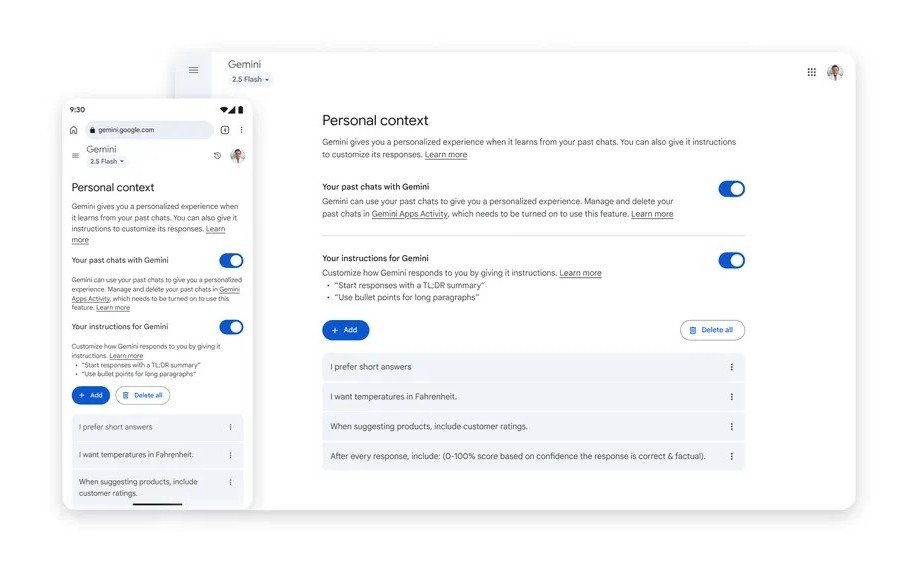
On paper, it’s brilliant. Ask for a birthday party idea and Gemini might throw you a Swahili Coast-themed bash with pilau, madafu, and a photo booth stocked with kitenge props. Need book suggestions? It’ll serve up African authors you’ve already enjoyed, plus memorable quotes to spice up your WhatsApp status. This new “Personal context” setting is on by default (because of course it is), but you can switch it off in Settings → Personal context → Your past chats with Gemini.
If you’re side-eyeing the idea of Google logging more of your personal convos, you’re not alone — especially after recent reports that chats with AI models like ChatGPT and Meta AI have been ending up in Google Search results. It’s crazy that private conversations are floating around online for strangers to stumble upon, almost like leaving your M-Pesa PIN scribbled on a matatu seat. Google hasn’t said Gemini chats will appear in search, but the timing of this “memory” feature feels… let’s just say interesting.

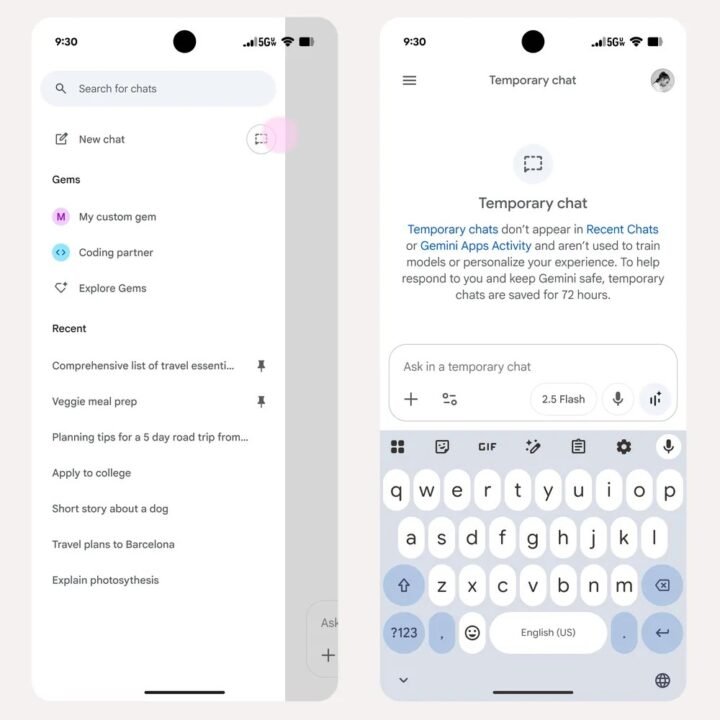
Enter the other half of this update: Temporary Chat. This lets you have one-off, no-strings-attached conversations that won’t be saved or used to train Google’s AI. They disappear from your history after 72 hours. Sounds like the perfect antidote to oversharing, except there’s a catch. You have to manually turn it on for each chat. Which means if you forget? Well, your top-secret plan to start a chapati delivery business might live on in Gemini’s memory. Temporary Chat should be the default, but hey, I’m not in charge of Google’s privacy strategy.

Google’s also rolling out more granular data controls, including the option to decide whether your uploaded files or shared audio/video are used to improve services. The company insists trust is all about transparency and control. But the real control comes from remembering to tweak those settings before you pour your digital soul out to Gemini. For now, the advice is simple: enjoy the smarter, more personalized AI banter. If you’re talking secrets, maybe hit that Temporary Chat button first.
It’s important to note that this feature only works when your Gemini Apps Activity is turned on. For now, it’s not available if:
- You’re under 18, or signed in to a work or school Google Account.
- You’re in the European Economic Area, Switzerland, or the United Kingdom.
You can still get a personalized experience from Gemini Apps based on your past chats if you’re eligible and select 2.5 Pro from the drop-down at the top of the screen.
If you’d like to change whether Gemini uses your past chats to personalize responses:
- Go to gemini.google.com.
- At the bottom, click Settings → Personal context.
- Toggle “Your past chats with Gemini” on or off.
To delete your past chats entirely, head to Your Gemini Apps Activity and manage them there.
Personalized conversations are first rolling out on Gemini 2.5 Pro model in select countries (excluding European Economic Area, Switzerland, or the United Kingdom). Google says it will expand to the 2.5 Flash model and more countries in the coming weeks.








Join the discussion