
Android has always been open to sharing, letting you swap files via standard Bluetooth or Quick Share. Apple, meanwhile, chose isolation: AirDrop ignored the outside world, and the iPhone’s Bluetooth famously refused to handle file transfers. That stubborn divide ends today, because Google decided to stop waiting for permission and simply made the connection happen.
In a surprise move Google has announced that Android’s Quick Share now works natively with Apple’s AirDrop.
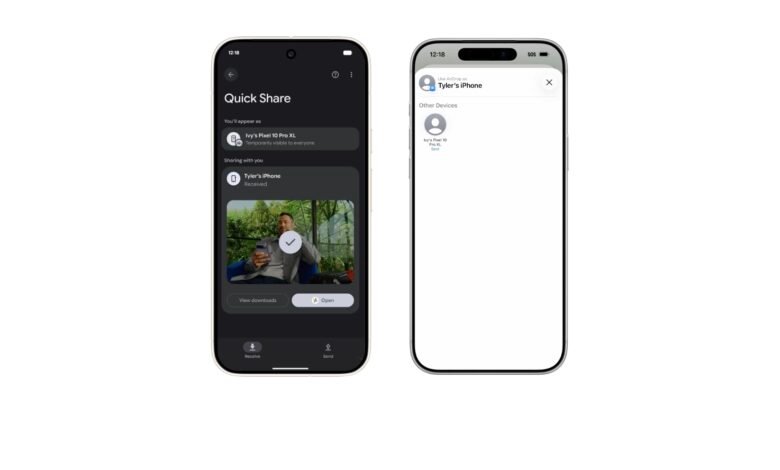
This isn’t the clumsy “download this app on both phones” workaround we’ve seen from Chinese manufacturers for years. This is the real deal: a Pixel 10 can now see an iPhone in its share sheet, and to that iPhone, the Pixel simply looks like another Apple device.
How It Works:
According to Google, this integration allows for direct, peer-to-peer transfer of photos, videos, and files. There are no servers involved, and no data is logged.
The mechanism is both simple and technically audacious. For the transfer to work, the iPhone user just needs to have AirDrop set to “Everyone for 10 minutes” – the standard setting you use when receiving a file from a new contact. Once that’s active, the iPhone appears on the Pixel 10’s Quick Share radar. When the Pixel initiates the transfer, the iPhone user sees a standard AirDrop acceptance prompt.
Google confirmed to 9to5Google that they did not partner with Apple on this. Instead, they are leveraging their “own implementation,” essentially reverse-engineering the AirDrop protocol to make Android speak Apple’s language.
To quell the obvious security fears that come with spoofing a proprietary protocol, Google has gone on the offensive. The feature is written in Rust—a memory-safe language that is quickly becoming the industry standard for secure systems—and has been verified by NetSPI, a third-party penetration testing firm. Google claims this implementation is “notably stronger” than other industry attempts, likely a jab at the various insecurity-plagued reverse-engineering projects found on GitHub.
The “App” Difference
To understand why this is a massive shift, look at what companies like OPPO have been trying to do. OPPO has long offered iPhone integration, most recently through its “O+ Connect” system. But that solution always came with a fatal flaw: it required the iPhone user to download a specific app (O+ Connect) to receive the files.
Asking an iPhone user to install an app just to receive a photo is a non-starter in social situations. Google’s solution removes that friction entirely. The iPhone user doesn’t need to change their behavior or install software; they just need to be open to AirDrop.
The Ecosystem Battlefield
While this is a technical triumph, it highlights the messy reality of “interoperability” in 2025. Google is simultaneously fighting two different wars: one against Apple’s hardware exclusivity, and another against carrier greed.
Take a look at Kenya. While Google is busy bridging the gap between Android and iOS, carriers like Safaricom are actively dismantling Google’s other bridge: RCS. As we reported earlier, Safaricom has started urging users to turn off RCS entirely. Why? We don’t know. Our guess is probably because RCS uses data, bypassing the lucrative SMS fees that carriers rely on.
It’s a stark reminder that even if Google builds the technology, they can’t always force the ecosystem to play nice. In Kenya, the carrier is the blocker. In the US, it’s usually Apple. By reverse-engineering AirDrop, Google is effectively bypassing the “Apple blocker,” but they are risking a game of whack-a-mole if Apple decides to patch this “exploit” in the next iOS update.
Why Only Pixel?
The biggest question remaining is availability. Right now, this feature is exclusive to the Pixel 10 series. Google says it will “expand to more Android devices,” but the timeline is vague.
This puts other Android heavyweights in a weird spot. Samsung, Xiaomi, and Transsion (which dominates the African market) are likely watching closely. If Samsung adopts this, it solidifies “AirDrop compatibility” as a standard Android feature, making it much harder for Apple to break it without angering millions of users.
For now, Pixel 10 owners are the only ones who can breach the wall. To enable Quick Share-AirDrop integration it, you’ll need to dive into Settings > Google Services > Privacy & security > System services and update the “Quick Share Extension.”
It’s a brave new world for file sharing – at least until (when/if) Apple sends the cease and desist.