
For months, Google has been steadily integrating its Gemini Nano on-device AI model into the desktop version of Chrome, powering features like “Help me write.” Also, the company recently added native HLS playback to Chrome, Edge, and other Chromium desktop browsers. And now, it appears that Android users are next in line.
In a fascinating cross-company collaboration, Microsoft engineers are working alongside Google to bring a suite of “Writing Assistance” tools to the Chromium codebase for Android. This move suggests that these AI features won’t just be exclusive to Google’s Chrome, but will likely land on Microsoft Edge for Android as well.
What’s coming to your browser?
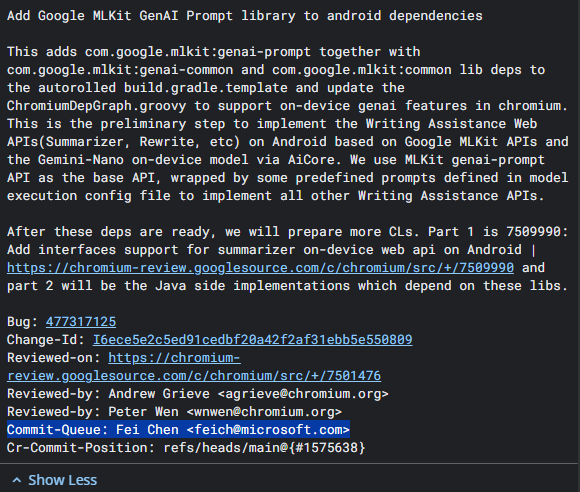
According to recent commits (code updates) spotted in the Chromium Gerrit by researcher Leopeva64, Microsoft engineer Fei Chen is leading the charge to implement Writing Assistance Web APIs on the Android platform.
For the average user, this translates to several powerful new features built directly into the browser:
- Summarization: The ability to take a long-form article or a complex webpage and condense it into a few bullet points instantly.
- Rewriting: Tools to help you draft emails or forum posts by changing the tone, length, or clarity of your text.
- On-device processing: Because this uses the Gemini Nano model via Android’s AiCore, the AI “thinking” happens directly on your phone. This means faster responses and better privacy, as your data doesn’t necessarily need to be sent to a cloud server to be processed.
The Microsoft-Google collaboration
While Google and Microsoft are fierce competitors in the browser space, both Chrome and Edge are built on the same Chromium foundation. By contributing this code, Microsoft ensures that Edge for Android stays competitive with AI features.
The technical groundwork involves adding Google’s “MLKit GenAI” libraries to Android’s dependencies. This acts as the bridge that allows the browser to talk to the AI hardware on your phone. The code notes specify that while Chrome might use its own internal methods, these new updates ensure that “non-Chrome” browsers (like Microsoft Edge, Brave, and others) can also perform AI tasks locally on the device.
When can you expect it?
The development is currently in the “preliminary steps” phase. The engineers have already begun implementing the backend interfaces that handle things like checking if your phone is powerful enough to run the model and managing the actual text generation.
There is no firm release date yet, but as the “Part 1” and “Part 2” phases of the code are being merged, we could see these features appear in “Canary” or “Dev” versions of Chrome and Edge for Android in the coming months.
This is a win for the Android ecosystem, more so for users of non-Chrome browsers like Microsoft Edge and others. By moving AI tools from the cloud directly onto the device, browsing becomes more interactive without sacrificing speed. For users in Kenya and globally who rely on mobile-first browsing, having a “Summarize” button built directly into the browser will be a massive productivity boost for digesting news and research on the go.