
Over a year ago, we dove deep into the Safaricom eSIM experience here in Kenya, and one of the most glaring takeaways was the relentless “Your SIM sent a text message” pop-up on iPhones. It was an incredibly annoying glitch that interrupted everything from typing an email to scrolling through social media. Fast forward to today, and going by fresh reports, this phantom message is still haunting Safaricom users.
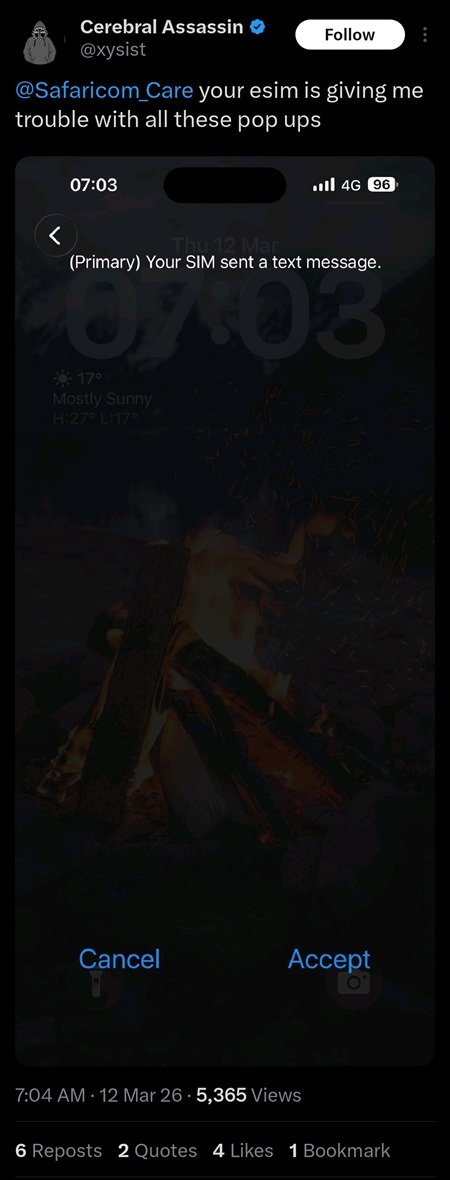
When we initially pressed Safaricom for answers, the official response was essentially a stopgap: “Our apologies for the experience, to clear the error you have to use the physical SIM card for now as we seek a permanent solution from our partners.” Ditching the very technology you just upgraded to isn’t exactly a solution.
However, by mid-2025, the telco quietly changed its tune. Support agents began advising users experiencing the bug to visit a Safaricom shop for an eSIM replacement. This heavily implies that the “Your SIM sent a message” bug is tied to a specific, older batch of eSIMs, and swapping to a newer range resolves the conflict.
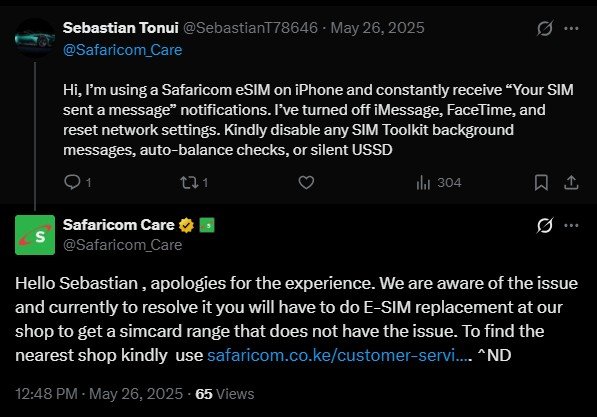
Has it completely worked? Yes and no. I’m still seeing fresh complaints online, which likely means plenty of users are still walking around with profiles from the affected batches. If you are still dealing with this pop-up, your best permanent fix is to head to a Safaricom shop and request a fresh eSIM. If you can’t make the trip right away, a quick workaround from the community is toggling off VoLTE in your cellular settings, though you’ll sacrifice voice call quality to do so.
Interestingly, I haven’t seen this specific issue crop up on Airtel eSIMs at all; it remains uniquely a Safaricom headache.
But the phantom messages are just the tip of the iceberg.
Lately, the complaints have shifted from annoying UI pop-ups to actual functional roadblocks. Some iPhone users rocking a Safaricom eSIM are reporting sudden network instability, painfully delayed USSD code loading, and completely broken M-PESA menus.
If you rely on Lipa na M-PESA daily, the eSIM switch might just leave you stranded at the worst possible time. I’ve tracked several reports of STK push prompts completely failing to appear when paying at supermarket tills or trying to exit a parking building. One frustrated user on X perfectly captured the experience: “Ukiweka E-Sim kwa iphone, Kulipa na prompt inakua balaaa sana.” Another quickly chimed in, pointing out how “this thing has gotten me stuck at parkings severally.”
Currently, Safaricom support is handling these M-PESA prompt failures on a case-by-case basis, asking affected users to DM their account details, till numbers, and store details for backend troubleshooting.
It’s not all doom and gloom, though. In my analysis of these reports, it’s clear these problems aren’t universal. Hardware and software combinations play a massive role here. Some users upgrading from older hardware like the iPhone 16 to the iPhone 17 report that the phantom pop-ups vanished entirely upon setting up the new device.
On the software side, a significant chunk of the recent network drops and M-PESA USSD delays appears tied to Apple’s recent iOS 26.3 update. If your Lipa na M-PESA prompts suddenly died after a recent software update, hold tight. Early reports from testers running the iOS 26.4 beta indicate that the USSD and network bugs have been thoroughly squashed.
For now, if you’re on a Safaricom eSIM and struggling with your iPhone, your immediate checklist should be: get a new eSIM batch from a physical shop to kill the pop-ups, toggle off VoLTE as a temporary band-aid, and keep refreshing your settings for that iOS 26.4 drop to fix your M-PESA woes.