
If you’ve been following the latest tech news in Kenya, you know Safaricom recently launched the unified My OneApp. The premise is simple: merge the M-PESA app and the MySafaricom app into one super app to rule them all.
Naturally, when my home internet expired recently, I figured it was the perfect time to put the new interface to the test. Since the services from the old MySafaricom app are now baked in, paying for my 5G Home Wi-Fi should have been a breeze.
Instead, it was a reminder that “unified” doesn’t always mean functional.
“An unexpected error occurred”
For basics like buying airtime, sending money or withdrawing, the app actually holds up. The interface feels fresh, and the simple scrolling is smooth enough. But the moment I tried to pay for my home internet, things fell apart.
I navigated to the Home Internet option under Quick Actions. The app briefly showed a loading animation as if it was fetching my account details, but then… nothing. Instead of a payment screen, I was greeted with a vague error message: “An unexpected error occurred.”
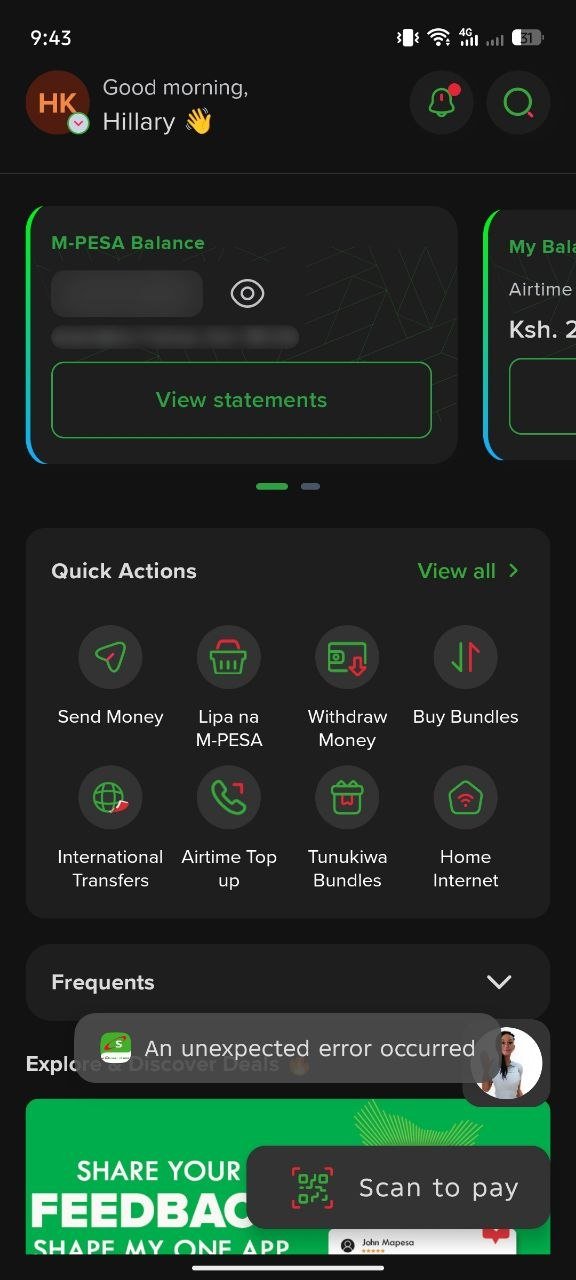
The prompt disappeared as quickly as it came, leaving me staring at the home screen. I tried this multiple times, but the result was always the same. This function is clearly broken, joining a growing list of bugs Safaricom has already acknowledged are plaguing the new rollout.
After several failed attempts, I did what any frustrated user would do. I went back to what works. I opened the original MySafaricom app, which is thankfully still up and running. Within seconds, I had paid for my 5G Home Wi-Fi and was back online.
This experience highlights a massive disparity in how Safaricom is handling this transition.
While I’m relieved the MySafaricom app hasn’t been killed off yet, the same can’t be said for the M-PESA app. Safaricom has already replaced the standalone M-PESA app in major app stores with My OneApp. This means if an M-PESA app user encounters a breaking bug like I did, they can’t simply switch back to a stable version without jumping through significant hoops.
The verdict? Don’t delete the old apps yet
It’s clear Safaricom has plenty of work to do to get My OneApp to a production-ready state for all its features. My advice? Keep the old MySafaricom app on your phone for as long as Safaricom allows it.
The telco should have taken a page out of their own book and kept the M-PESA app available as a fallback until the “unexpected errors” in My OneApp are finally dealt with. For now, if you need to renew your home internet, you might want to stick to the old reliable methods.
Have you paid for your Safaricom home internet using the new My OneApp? Let us know in the comments.