

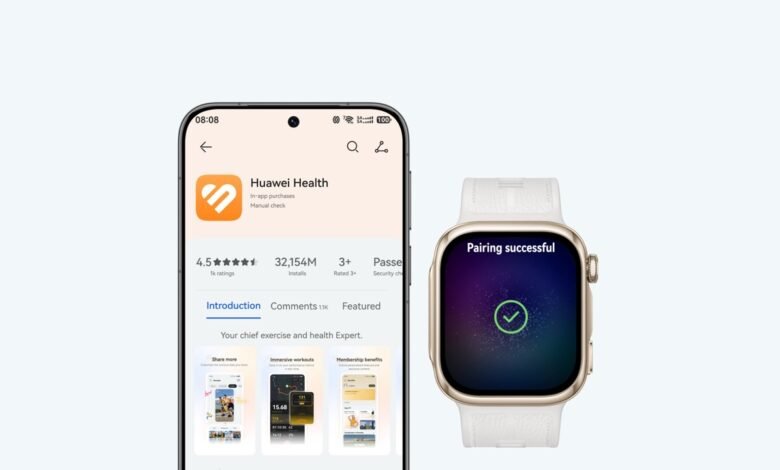
Huawei phone owners in China can now get their phone’s alerts on an Apple Watch, through a dedicated app. The connection also lets them make the watch ring when they can’t find it. Those are useful everyday functions for someone who already owns an Apple Watch and wants to use a Huawei phone. However, you still need an iPhone for the watch’s initial setup, just like on vivo’s version of this, which we covered last week.
The app is called 鸿蒙星河互联(Watch), and it’s listed in China’s App Store separately from the iPhone version of Huawei’s interconnection software. It’s free, names Thunder Software Technology Co., Ltd. as the developer, and is on version 1.0.1, dated 1st October 2026. Its description lists two features, message forwarding and device finding. It needs a Huawei phone running HarmonyOS 7.0.0.109 or later and a watch running watchOS 10.0 or later. HarmonyOS is the operating system Huawei built to replace Android on its Chinese devices, and in August we reported it had become the world’s third-largest mobile operating system.
Huawei’s support list only has three products on it for now: the Pura X View, the Mate 90 series and the Mate XT 2 tri-fold. So having HarmonyOS 7 on another Huawei phone doesn’t make it eligible.
How the connection works
Keep both devices close together and online, with Bluetooth on and both screens on and unlocked. Install the app on the watch and open it. It shows a QR code, which you scan with a Huawei phone signed into a Huawei account. Then follow the connection prompts.

Apple lets you download apps straight from the App Store on the watch. So if your watch is already set up, you can install this app without going through the Watch app on an iPhone. That doesn’t change how the watch gets set up in the first place: Apple’s instructions still pair a new watch with an iPhone. If you’re buying an Apple Watch to use with a Huawei phone, you’ll need access to an iPhone before the Huawei side does anything. Our Series 12 versus Ultra 4 comparison covers what the two newest models cost in Nairobi and what the extra money buys.
For alerts to arrive, the watch needs notification permission at both the system and app level, an internet connection, and the interconnection app running. Common apps are switched on by default. Others need their forwarding switches turned on in the app. If notification permission is denied, messages can still land in the app’s forwarding history without ever buzzing your wrist. Focus mode, Apple’s setting that filters notifications, needs the relevant permission too. That’s why a successful connection doesn’t guarantee that every app will notify you.
To find the watch, open NearLink and Bluetooth settings on the Huawei phone (just Bluetooth on some models), select the connected Apple Watch and tap ring-to-find. The watch rings so you can follow the sound. Huawei doesn’t mention map-based tracking in this procedure, so don’t expect to see the watch on a map.
What it doesn’t do
The app’s listing mentions only alerts and finding the watch. It says nothing about answering Huawei calls on the watch, replying to messages, or syncing health records back to the Huawei phone. Nor does it say the Huawei phone can manage Apple Pay or activate the watch’s cellular plan. Huawei’s FAQ does cover incoming-call alerts reaching the watch, but an alert on your wrist doesn’t mean you can pick up the call there.
That’s a shorter list than vivo’s. vivo’s international watch app, Origin Health Connect, forwards calls, lets you control the phone’s camera and music from the watch, and sends steps, heart rate, sleep and workout data back to vivo’s fitness app. vivo has also had a Chinese version of its watch app in the App Store since May 2025, so Huawei is later to this, and its first version does less.
What this means outside China
When we covered HarmonyOS 7 last month, we explained that Huawei’s international phones run different software. Take the Pura 90s Pro Max, which went global in July: Huawei’s Saudi Arabian spec page lists EMUI 16.0. EMUI is Huawei’s Android-based software for phones sold outside China, and it doesn’t meet this app’s HarmonyOS requirement.
The China listing also isn’t a worldwide rollout. When we checked on 12th October 2026, the Watch app wasn’t in the Kenyan, US, UK or Hong Kong App Stores. Huawei’s FAQ for the related iPhone app says plainly that the phone-to-phone feature isn’t supported overseas for now. The Watch FAQ gives no overseas guidance at all. So it isn’t clear whether the Watch app is supported outside China, including for anyone who imports one of the eligible Chinese phones.
That iPhone FAQ also describes an indirect route. Connect the Huawei phone to an iPhone through the interconnection app, then turn on that app’s mirrored notifications in the iPhone’s Watch app. Huawei phone alerts then reach the Apple Watch by way of the iPhone. That’s a separate setup from installing the Watch app and connecting it to the Huawei phone directly.
For people with an eligible phone, this makes an Apple Watch they already own more useful, with alerts on the wrist and a way to find the watch. For anyone choosing a new watch mainly to use with a Huawei phone, it’s a limited option, because you need an iPhone for setup and the feature list is short. Outside China, it isn’t an option yet.



Join the discussion