
In the era of digital payments, the M-PESA PIN is sacrosanct. It is the final barrier between your wallet and the world, the digital equivalent of a signature. So, when Kenyans started noticing money leaving their accounts, specifically for the Social Health Authority (SHA), without that familiar prompt to enter a PIN, the online reaction was swift, furious, and understandable.
But according to Safaricom, this isn’t a security glitch or a “backdoor” withdrawal. It is a feature—one designed for convenience that many users may be utilizing without fully understanding the mechanics under the hood.
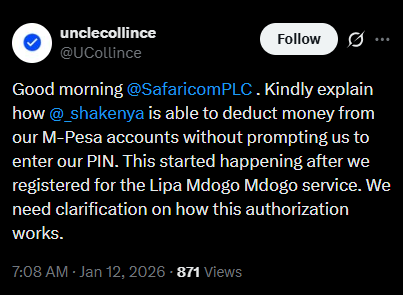
The conversation ignited earlier this week when an X (formerly Twitter) user, Collince, flagged a concerning trend. After registering for the Lipa Mdogo Mdogo service, his mother noticed that SHA deductions were hitting her M-PESA account automatically, bypassing the standard PIN authorization screen entirely.
"Kindly explain how @_shakenya is able to deduct money from our M-Pesa accounts without prompting us to enter our PIN... We need clarification on how this authorization works."
The sentiment resonated immediately. For many, the idea of an automated, PIN-less deduction feels like a violation of the basic “natural laws” of mobile money security. Reactions poured in, with some calling it “illegal consent” and others questioning what protects the user if the PIN becomes optional.
Safaricom’s response: Enter M-PESA Ratiba
Safaricom’s customer care team responded quickly, pointing the finger not at a system error, but at a specific service: M-PESA Ratiba.
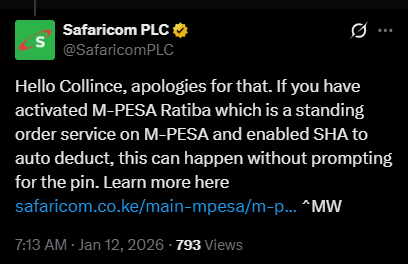
"If you have activated M-PESA Ratiba which is a standing order service on M-PESA and enabled SHA to auto deduct, this can happen without prompting for the pin," Safaricom explained.
In short: The system didn’t ask for a PIN now because you likely already gave it then—when you set up the standing order.
How M-PESA Ratiba actually works
To understand the controversy, you have to understand the tool. M-PESA Ratiba is effectively a “standing order” facility for your mobile wallet. Just as you might instruct a bank to automatically pay your rent on the 5th of every month, Ratiba allows M-PESA users to automate recurring payments.
The service operates in two modes:
- My Reminder: The app nudges you when a bill is due, but you still have to manually initiate the transaction and enter your PIN.
- My Subscriptions: This is the “silent” mode in question. It is pre-authenticated. When you set this up, you authorize Safaricom to deduct a specific amount at a specific time (daily, weekly, or monthly) automatically.
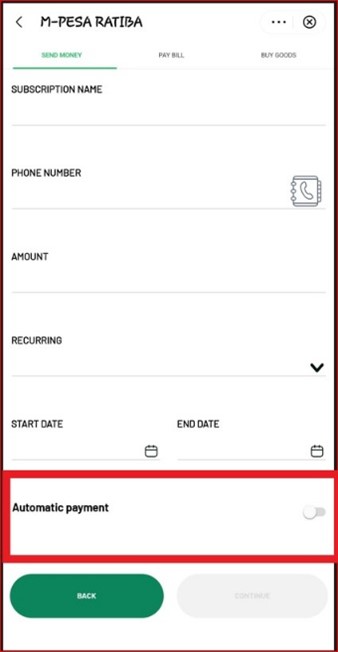
Because the authentication happens during the setup phase (where you do enter your PIN to “sign” the contract), the actual deduction doesn’t need to bug you again. It just works.
The friction we are seeing online isn’t really about the technology failing; it’s about the onboarding process.
The user noted these deductions began after signing up for Lipa Mdogo Mdogo (Safaricom’s device financing plan) and engaging with SHA services. It is highly likely that during the registration for these services, an “auto-deduct” or “standing order” clause was agreed to.
Technically, the consent is there. Practically, however, many users feel blindsided because they view M-PESA as a strictly “transaction-by-transaction” service.
Why M-PESA Ratiba is actually good news
Despite the current backlash, M-PESA Ratiba is precisely the kind of fintech evolution the market needs.
For years, the biggest headache with mobile bills has been memory. Forgetting to pay your electricity bill means a blackout; forgetting insurance premiums means a lapse in cover; forgetting Lipa Mdogo Mdogo payments can lock your phone.
Ratiba solves this by offering a “Set It and Forget It” solution.
- Zero penalties: By automating rent, school fees, or loan repayments, you avoid the embarrassment and cost of late fees.
- Transparency: You can view your total budget and active subscriptions via the M-PESA Super App or USSD.
- Control: Crucially, you can pause or revoke a standing order at any time. If you are tight on cash one month, you aren’t locked in forever.
The anger surrounding the SHA deductions is a classic case of a valid feature landing on an unprepared user base.
If you have opted into a service that requires recurring payments, M-PESA Ratiba is the most efficient way to handle it. It removes the friction of daily manual inputs. However, transparency is key. Users need to be explicitly aware that by clicking “Agree” on a service like SHA or a device loan, they are effectively setting up a digital direct debit.
Want to check if you have active silent deductions? You can view and manage your standing orders by dialing *334# (Select Option 9) or checking the M-PESA Ratiba Mini-App on the M-PESA Super App.
If you see a subscription there, it’s not a thief—it’s a robot you hired to pay your bills, doing exactly what it was told to do.
What do you think? Is M-PESA Ratiba a convenient lifesaver or a step too far for mobile money security? Let us know in the comments.