
Safaricom appears to have quietly removed the popular “Make Ur Bundle” feature from the latest v1.27.1.10 of the MySafaricom app. The change, spotted in the latest server-side updates to the application, removes the dedicated tile that allowed users to create custom data and voice combinations.
For years, the “Make Ur Bundle” feature was a favourite for users who wanted granular control over their spending. It allowed you to set an exact amount—say, KES 20—and decide exactly how much of that went to data or voice minutes. It was the ultimate tool for avoiding the rigidity of fixed bundles.
As of this writing, however, that flexibility is gone from the app interface. As seen in screenshots shared below, the “Bundles” grid which previously hosted the “Make Ur Bundle” tile (usually sitting next to “Go Monthly”) has been rearranged. The option is simply… gone.
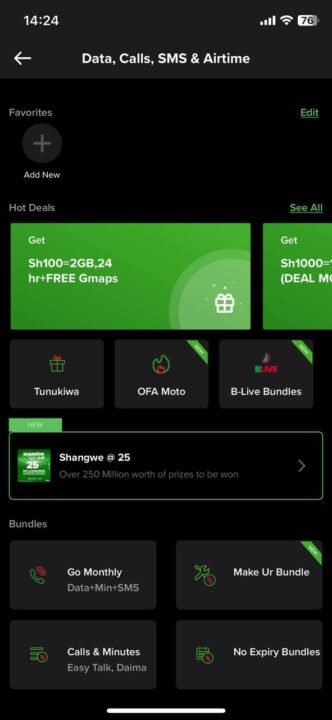
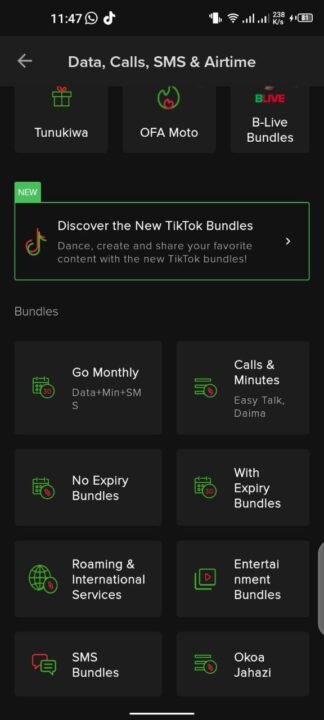
Currently, the app pushes users toward:
- Go Monthly: Fixed 30-day plans.
- Tunukiwa: Personalized offers (which are random and algorithmically determined).
- No Expiry: Standard pre-set bundles.
Thankfully, the backend system for creating custom bundles hasn’t been decommissioned. You can still access the feature the old-fashioned way:
- Dial
*544#on your Safaricom line. - Select Option 6 for “Make Ur Bundle”.
- Follow the prompts to define your validity and resource split.
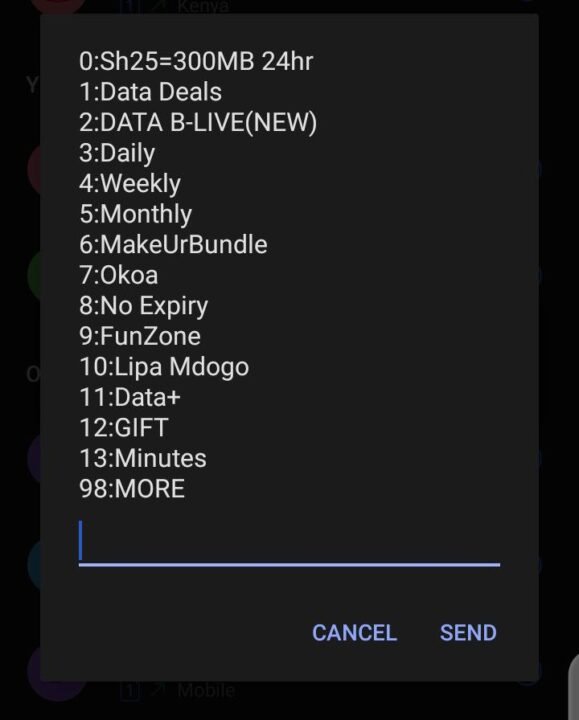
While functional, this forces users back to a text-based interface in 2026, a jarring disconnect for a company pushing a “digital-first” lifestyle.
But why remove it? Typically, UI simplifications like this happen for one of two reasons: low engagement or revenue optimization.
It is possible that Safaricom wants to nudge users toward the Tunukiwa (Hot Deals) section, where the offers are dynamic and often expire within 24 hours, or the Go Monthly plans which guarantee higher Average Revenue Per User (ARPU). “Make Ur Bundle” was a tool for the thrifty, allowing you to spend exactly what you had, down to the shilling. By removing it from the app, Safaricom adds friction to that thriftiness, perhaps hoping you’ll just tap a convenient (and slightly more expensive) pre-made bundle instead.
For now, if you want full control, you’ll have to memorize the USSD codes again.