

For years, the advice on passwords has been correct and annoying in equal measure. Use a long, unique password for every account. Never repeat them. Replace the ones that leak. But it’s quite tedious to visit every single site and manually update the leaked or weak passwords. It feels exhausting.
At WWDC 2026, Apple showed a fix that feels almost magical. In iOS 27, the built-in Passwords app can find your weak and compromised logins and replace them with strong ones for you. You tap once. Your iPhone handles the rest.
What Apple actually announced
The Passwords app is not new. Apple launched it in 2024, built on top of the older iCloud Keychain system. Since then it has quietly flagged logins that are weak, reused across several sites, or known to have turned up in a data breach. While spotting a bad password is easy, fixing it meant going to each website yourself, hunting for the account settings, and changing the password one site at a time.
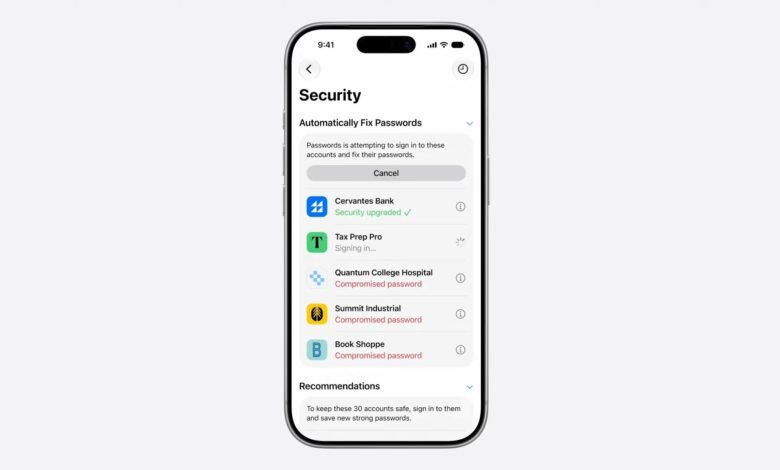
iOS 27 removes that step. The Passwords app will now work with Apple Intelligence and Safari to take action on your behalf. It goes to each eligible website, signs in with your saved details, and upgrades the account to a strong password. Apple calls this approach “agentic”, which simply means the software completes a multi-step task on its own after you start it. You are no longer the one clicking through five settings pages per account.

How it works in practice
The flow is meant to be almost invisible. You open the Passwords app, see the accounts flagged as weak or compromised, and approve the fix. From there, Apple Intelligence and Safari work through the list in the background. While it runs, iOS 27 shows a Live Activity so you can follow the progress rather than wonder what your phone is quietly doing. Apple says it only acts on what it calls “eligible” accounts. The company has not yet spelled out exactly what makes an account eligible, so expect that maybe some logins may be left untouched.
This sits inside a wider set of Safari upgrades announced the same day. Safari in iOS 27 can also group your open tabs into topics on its own, build small custom extensions when you describe what you want in plain language, and watch a single web page and alert you when something changes, like a product coming back in stock.
The privacy question
Handing a browser the keys to log into your accounts sounds like the opposite of safe, and I’m sure Apple clearly knew people would think that. Its pitch is that the whole process is built to keep your information private, and that no personal browsing data is exposed to Apple or to anyone else while the feature runs. That is the claim. Let’s wait and see what comes up with the developer beta now live.
The catch
Here is the part that matters for whether you will ever see this. This is an Apple Intelligence feature, so it needs an iPhone that supports Apple Intelligence. That means an iPhone 15 Pro or newer, not every phone that can install iOS 27. Apple is proud that iOS 27 reaches devices as old as the iPhone 11, but this particular tool may not be coming to those older phones. Apple has not yet published a feature-by-feature device list, so treat the exact cut-off as something to confirm when the final requirements go up.
There is a regional question too. Apple confirmed its new Siri AI features will not launch in the European Union or China at first, blaming the Digital Markets Act. It is not yet clear whether this password tool falls under that same block, since Apple Intelligence already operates in the EU. For readers in Kenya, the EU and China restrictions do not apply.
The bottom line
Reused and breached passwords are still the most common way ordinary accounts get taken over, and the reason people keep them is not laziness so much as friction. iOS 27 is dealing with the friction. If it works as shown, fixing a pile of risky logins becomes a single tap instead of taking up your whole afternoon. The two things to watch before trusting it are how reliable the agent is when real websites behave unpredictably.








Join the discussion