
If you use the KCB mobile banking app, you may want to pay close attention to how you log in.
An interesting discovery shared by a KCB customer on X has prompted an equally surprising response from the bank. According to the user, the app appears to authenticate six-digit PINs using only the last four digits, effectively ignoring the first two digits altogether.
Naturally, the customer wanted to know whether this was an intentional design choice or a security flaw. KCB’s response was unexpected.
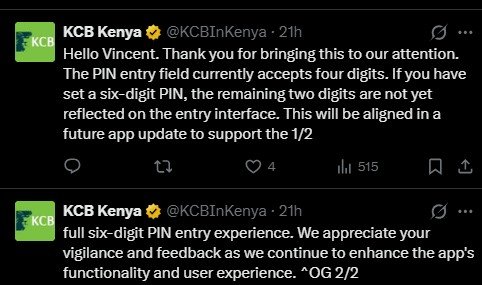
"Thank you for bringing this to our attention. The PIN entry field currently accepts four digits. If you have set a six-digit PIN, the remaining two digits are not yet reflected on the entry interface. This will be aligned in a future app update to support the full six-digit PIN entry experience. We appreciate your vigilance and feedback as we continue to enhance the app's functionality and user experience."
That statement effectively confirms what the customer observed: the current login interface authenticates using only four digits, even if a user has configured a six-digit PIN.

What exactly is happening?
Based on the user’s findings, changing the first two digits of a six-digit PIN doesn’t affect authentication. For example, if a customer originally set their PIN as 123456, they could apparently enter 993456, 003456, or any other combination with the same final four digits, and the app would still accept it.
In other words, the last four digits appear to be doing all the work.
While KCB says this is because the app’s PIN entry field currently supports only four digits, the response raises an obvious question: why does the app allow users to create six-digit PINs in the first place if only four digits are actually being used during authentication? That’s the part many users are likely to find confusing.
From a security perspective, PIN length matters because every additional digit significantly increases the number of possible combinations. A four-digit PIN has 10,000 possible combinations while a six-digit PIN has 1 million possible combinations. If an application only verifies four of those digits, then users aren’t receiving the additional security they reasonably expect when choosing a longer, six-digit PIN.
To be clear, there’s no evidence that customer accounts have been compromised because of this behaviour. Likewise, KCB hasn’t described it as a security vulnerability, instead characterizing it as a limitation of the current PIN entry interface that will be corrected in a future update. Still, I can understand why customers would be concerned. When an app asks you to create a six-digit PIN, the expectation is straightforward: all six digits should be required every time you authenticate.
KCB says a fix is coming
The good news is that KCB says the issue won’t remain this way forever. According to the bank, a future app update will “support the full six-digit PIN entry experience,” bringing the login screen in line with six-digit PINs already configured by some users. The bank hasn’t shared a timeline for when that update will roll out, nor has it clarified whether the current behaviour affects all customers or only certain versions of the app.
Until then, users should ensure they keep other account security measures such as their device lock screen, biometric authentication where available, and account monitoring enabled.
Hopefully, the promised update arrives sooner rather than later.









Join the discussion