

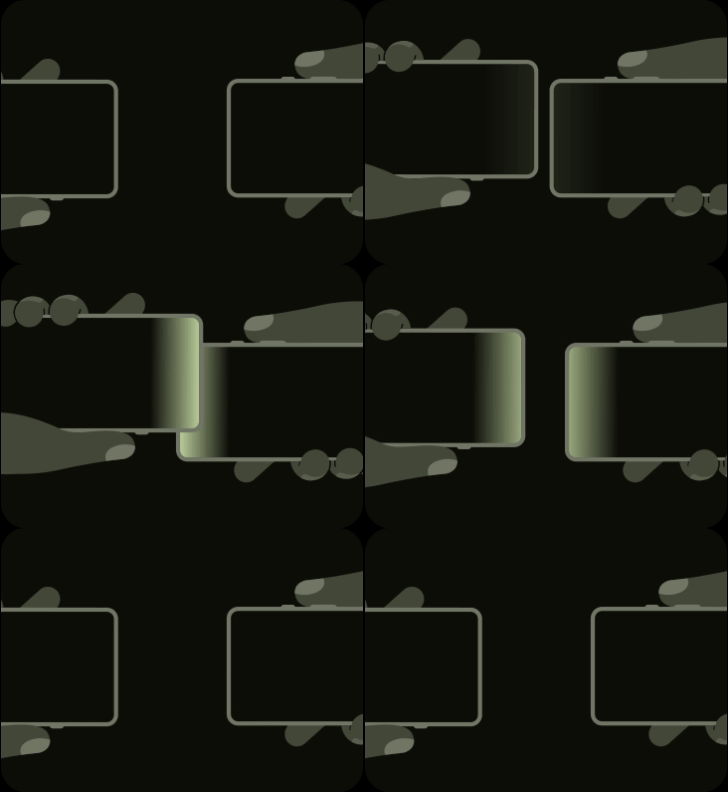
Google has switched on a new way to move files between Android phones. It is called Tap to share, it sits inside Quick Share, and it started rolling out on Wednesday 12 August alongside the Pixel 11 launch.
How it works is practical. Instead of hunting for the right person in a list of nearby devices, you hold two phones against each other and the transfer begins. Like the way you Airdrop with iPhones by holding/tapping two iPhones on each other/
First…
Quick Share is the tool built into Android for sending files to a phone next to you without using the internet. No WhatsApp compression, no Google Drive link, no data bundle. It was called Nearby Share until 2024, when Google folded it into Samsung’s identically named Quick Share. It finds the other phone over Bluetooth, then moves the file over Wi-Fi Direct, a phone-to-phone connection that never touches a router or a mobile network.
Tap to share does not replace any of that. It changes how the two phones agree to talk. Near field communication, the same short-range chip that lets you pay by tapping a card machine, now does the introduction, and Quick Share does the rest.

Second, how it works
Google’s help page lists the instructions well:
- Overlap the top of both unlocked phones, screens facing up so both people can see them, and hold until the screens glow.
- For contact sharing, you do this from the home screen and both phones swap contact cards at once. You pick which fields on your card to hand over, and you can choose to only receive the other person’s card without sending your own. Once it arrives you decide whether to save it to Contacts. Just like on iPhone.
- For anything else, open the file first, tap the share button, then tap the phones. Photos, videos, website links, your location and general files all work. The receiver has to accept.
- Pulling the phones apart cancels the transfer. Whatever you receive lands in Files, under Downloads, in a Quick Share folder.
Third, what your phone needs
Google’s blog post says you must have a Pixel 6 and newer, running Android 17 or higher.
Both phones need NFC turned on, and both need to be unlocked. If nothing happens, take off thick cases, or try holding the phones back to back.
With the Pixel 11, Google moved the NFC antenna to the top instead of leaving it near the middle of the back. That means with a Pixel 11 the tap works the way it works with Apple iPhones, top edge to top edge.
Anyone who used Android a decade ago will recognise the idea. Android Beam did NFC tapping from 2011, was deprecated in Android 10, and was removed entirely in Android 14. It was slow and it rarely worked first time.
Everyone else with an Android phone…
Google says the Galaxy Z Fold8 Ultra, Fold8 and Flip8 get it soon. Those three launched in July already running Android 17 through One UI 9, so the wait is on Google and Samsung flipping a switch.
Older Galaxy phones need One UI 9 first. Google promises everything else running Android 17 will be supported by the end of the year.
For Kenyans
Almost nobody in Kenya will use this in August. Google does not sell Pixels here through official retail, so every Pixel in the country arrived as an import. Our Pixel 11 price piece this week put the entry model at roughly KES 116,000 before shipping, duty and importer margin.
The feature starts being used locally when it reaches Samsung, TECNO, Infinix and Xiaomi, and only on models that have NFC at all. NFC is common on flagships and inconsistent below about KES 30,000. Check the spec sheet before you assume your phone can do this.
There is some small issue with the Pixel 6 and maybe the Pixel 7. We reported last recently that Google skipped the Pixel 6 and Pixel 7 entirely in the August update, and 9to5Google says the Pixel 6 has three releases left before support ends in October. So if you have a Pixel 6, you may get the new sharing gesture and lose software support in the next few months.
This is also Android to Android only. Quick Share does already talk to Apple’s AirDrop on some phones, but that is a separate feature with its own device list. We have walked through how to set it up on a Galaxy. Tapping your phone against an iPhone isn’t mentioned as being able to do anything for now.
Turn it off
Tap to share is on by default, except on phones with a managed work account. To turn it off, open Settings, tap Google, tap Quick Share, and switch off Tap to share.



Join the discussion