
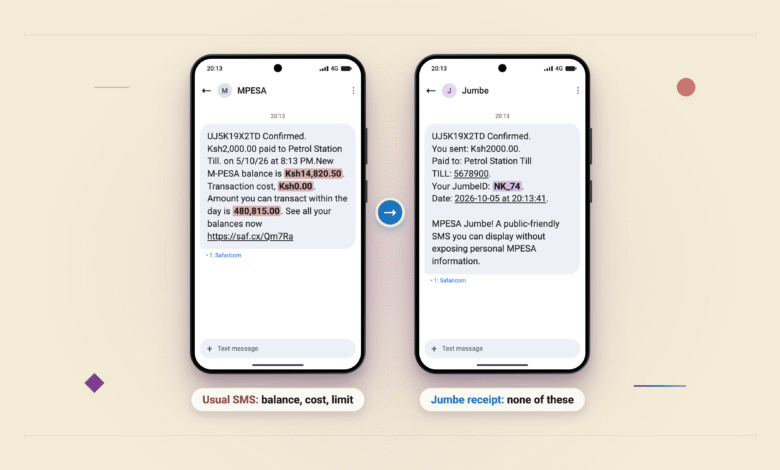
When you pay at a Till you usually get an SMS from M-PESA confirming it. That SMS also shows your M-PESA balance. So if a cashier asks for proof that you paid, showing them that SMS means showing them your balance.
Safaricom has now added a second SMS for this. It comes from a sender called Jumbe, and it is a receipt with no balance on it. You can show the cashier this one instead. Safaricom calls the feature Split Notifications.
You don’t sign up for anything. At a shop that has the feature switched on, you get two messages after you pay:
- the usual M-PESA one, and
- the Jumbe one.
At a shop that hasn’t switched it on, you only get the usual one.

The Jumbe receipt has the transaction code, the amount, the shop’s name and Till number, and the date and time. It has no balance. Your name and phone number are replaced by a short code called a JumbeID. That code is your first initial, your last initial and the last two digits of your phone number. Safaricom’s own example is a customer called Nancy Kamau whose number ends in 74, so her receipt says NK_74.
So a cashier who sees NK_74 learns far less than one who sees a full name and number. A shop with a few regulars could still guess who NK_74 is. In rare cases where two customers share a JumbeID, and the transaction code is what tells their payments apart.
Only the shop decides whether you get this receipt. The owner has to switch the feature on for that Till, and only the account’s main administrator can do that. You can’t switch it on yourself. Safaricom has not said whether you can switch the receipt off. If you pay and no Jumbe SMS arrives, that Till most likely hasn’t switched it on, and the usual M-PESA SMS, balance included, is the only proof you have.
Safaricom built the feature mainly for shop staff. An owner can nominate cashiers to get their own short SMS for each payment, so a cashier can confirm you have paid without phoning the owner or asking to see your phone. The owner’s own phone still gets the full usual M-PESA SMS.
The same feature also covers Paybills. Safaricom has only shown what a Till receipt looks like, and has not shown a Paybill one.
Safaricom published the FAQ and the merchant terms on 6th July 2026. Shops can switch it on by dialling *234# on a phone or in the M-PESA Business Hub, Safaricom’s portal for business accounts. As of 5th October 2026 its pages still list only those two ways, and the FAQ and terms haven’t been updated since 6th July. Safaricom has not said how many shops have switched the feature on.
Safaricom’s terms for shops cover Till and Paybill. They say Safaricom reserves the right to extend it to other services, including Pochi la Biashara, the M-PESA product for small informal businesses.
This is separate from the other M-PESA privacy change, where Safaricom hides parts of names and phone numbers in send-money SMS.
If a shop asks for proof of payment, show the Jumbe SMS and not the usual M-PESA one, because the usual one has your balance.






Join the discussion