

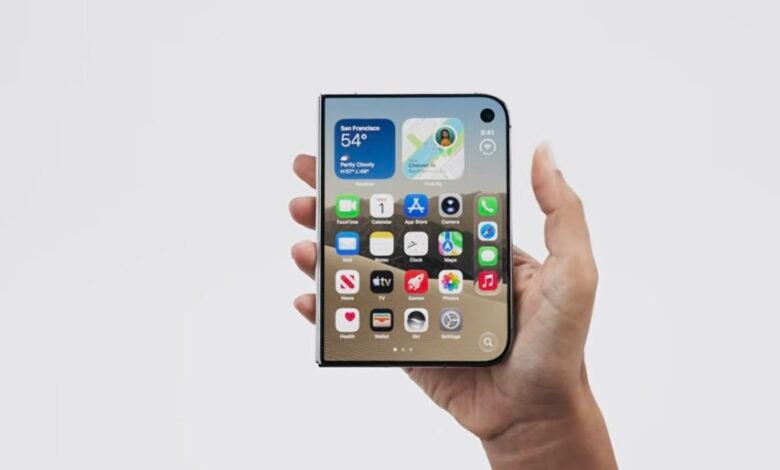
You can now unlock a closed iPhone Duo by looking at it, without joining Apple’s developer programme. The feature, called Unlock with Front Camera, arrived in the second public beta of iOS 27.3 on Thursday 19th November 2026. Developers got it three days earlier, in the second developer beta on Monday 16th November.
It deals with one of the main complaints about Apple’s first foldable. The Duo folds like a book and sells for USD 1,999 or about KES 260,000 in the US, yet it has no Face ID. Until now, every unlock went through Touch ID, the fingerprint sensor in the side button. When the first reviews came out last month, we noted that one reviewer found Touch ID so slow and clumsy that they unlocked the phone with an Apple Watch instead. The new option isn’t Face ID, though, and that explains every limit Apple has put on it.
Why this is not Face ID
Face ID on other iPhones uses the TrueDepth camera. It projects thousands of invisible dots onto your face to build a depth map, a 3D model of its shape, and takes an infrared image at the same time. So Face ID is designed to work in total darkness, and a printed photo of you won’t get past it. The Duo has no TrueDepth camera. Apple hasn’t said why, but those parts take up room, and the Duo is only 5.2mm thick when open.
Unlock with Front Camera uses the ordinary 12MP selfie camera above the Duo’s 5.4-inch outer screen, the one you see when the phone is closed. An ordinary camera only sees a flat picture, which gives it less to check than a depth map. Apple’s setup screen warns that the feature “isn’t as secure as Touch ID or Face ID”.

That’s why Apple has fenced it in. Your face only gets you past the Lock Screen, and only while the Duo is folded. Open it, and the inner 7.6-inch screen, whose camera sits under the display, still needs Touch ID. Apple Pay, saved passwords and locked apps also still ask for Touch ID or your passcode. And if you go 45 minutes without unlocking, the face option switches off until you use your fingerprint or passcode again. Apple’s Settings text puts it plainly: the camera works “along with a recent Touch ID or passcode authentication”. It adds that “face recognition data never leaves your device.”
Within those limits, it seems to work well. One early hands-on test found it faster than Touch ID. A photo held up to the camera didn’t fool it, and it worked in some low light but not in complete darkness.
So if you mostly use your Duo closed, you’ll pull it out of your pocket and get straight in without reaching for the side button. Pay for something or open a banking app, and you’ll still use your thumb.
What else the beta changes
The same beta adds a setting under Display & Brightness that locks the Duo when you fold it. By default, closing the phone moves whatever you were doing from the inner screen to the outer one. A separate Attention Aware setting keeps the outer screen awake while you’re looking at it and lowers some alert sounds. You don’t need to set up face unlock to use it.
To try face unlock, go to Settings, then Touch ID & Passcode, and turn on Unlock with Front Camera. You’ll scan your face by turning your head, much as you would when setting up Face ID. Joining the public beta is free through the Apple Beta Software Program with your Apple Account. Back up the phone first, since beta software can have bugs.
Apple hasn’t dated the final iOS 27.3, which is expected in December.




Join the discussion