

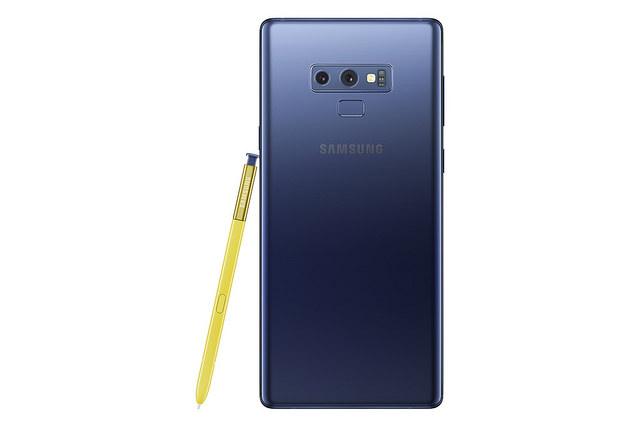
From when it was first introduced in 2011, the S Pen has gone ahead to become an iconic feature of the Galaxy Note series. Each new addition to the Note family introduces exciting capabilities to the S Pen. Over the years, these refinements have unlocked innovative ways for users to communicate with others and streamline work, play and everything in between.
The Galaxy Note9’s S Pen raises the bar with an array of convenient additions, including Bluetooth Low-Energy (BLE) connectivity, Samsung DeX compatibility, and integration with several fan-favorite Note features. Together, these enhancements offer much greater control over your mobile experience, making it easier to get the most out of everything you do.
The S Pen’s connectivity allows it to serve as an intuitive remote control for the Galaxy Note9, offering easy management key functions, including the device’s camera, from within 10 meters of the device. This means that when taking a selfie or a fun photo with friends, after launching the camera, rather than reaching for the shutter button, you can instantly snap your pic with a click of the S Pen’s button. A double-click will switch from the front to the rear camera, and vice versa.
Other apps that support the use of the S Pen as a remote control include the Gallery app and various presentation and media-player apps. A simple click or double-click will allows for play/pause a song, skip to the next track or video, or view the next/previous image in an album. The S Pen can even be utilised as a convenient clicker for presenting with the Galaxy Note9 and Samsung DeX. And with its open SDK (software development kit), developers will be able to integrate the S Pen’s intuitive controls into a wide range of apps that will allow users to streamline more tasks with a simple click.

BLE technology ensures that the S Pen is always ready whenever needed, enabling the device to pair with the Galaxy Note9 as soon as it’s removed, and maintaining a stable connection even when Bluetooth is turned off. The S Pen’s Super Capacitor takes just 40 seconds to reach full charge, and offers 30 minutes of power—or up to 200 clicks.
Note users are true multitaskers who require a phone that’s as versatile as they are. That’s why Samsung enhanced the Galaxy Note9’s S Pen with Samsung DeX support: to offer users more ways to get down to work.
Samsung’s ultimate productivity service solution has been enhanced for the Galaxy Note9 with highly portable HDMI adapters, which users can easily plug in to a display when on the go without the need for a separate device. In addition, there’s also the dual screen support that allows users to work simultaneously on the smartphone’s display and on a connected monitor.
Connecting the Galaxy Note9 to a monitor will also allow the utilisation of the device as a touch keyboard, a touch pad, or a surface for writing or drawing with the S Pen. The S Pen’s pressure-sensitive tip delivers a realistic and efficient writing experience when working on Samsung DeX, making it easy to, for instance, take notes on an interesting video that you’re watching on the monitor, or fine tune an image or illustration using your Galaxy Note9 and the Adobe software suite.
Screen off memo has also been made more dynamic, as the colour of the pen’s markings now matches the colour of the S pen itself—either yellow (for the Ocean Blue Galaxy Note9), light grey (for the Midnight Black model) or metallic copper.
Like the Galaxy Note9 itself, the S Pen is IP68 water and dust resistant3. So wherever your day takes you, and no matter conditions, you can rest assured that it’ll be ready to work.



Join the discussion