

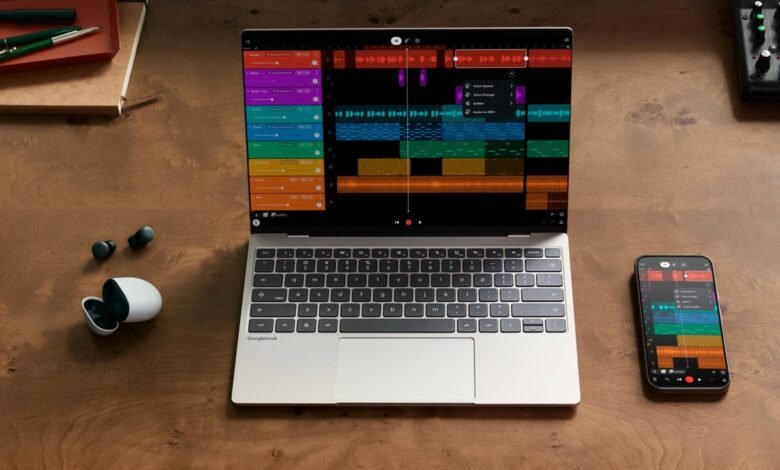
Samsung Galaxy phones can now connect to Google’s new Googlebook laptops. On Saturday 10th October 2026, Google said its phone features are arriving on Galaxy phones running One UI 9.0, the version of Samsung’s software built on Android 17. They come through Google Play and background updates over the next few days, so most owners won’t have to do anything.
A Googlebook is a laptop that runs Android, with the desktop parts of ChromeOS on top. Acer, Asus, Dell, HP and Lenovo make them, and when pre-orders opened in September we said the link with your phone is the main reason to pick one over another laptop. They reached US shops on 4th October, but Galaxy phones on Android 17 couldn’t connect to them. Two days later, Google said the features would roll out “across all Android 17 supported Samsung devices over the coming weeks”. It has not said why Galaxy phones missed the launch.
What a Galaxy phone can now do with a Googlebook
Google groups the phone features under the name Better Together, and four of them are coming to Galaxy phones.
- Cast My Apps opens a phone app in a window on the laptop. The app keeps running on the phone, and the Googlebook shows it and lets you use it, so you can use an app that has no laptop version without installing anything. It won’t work with some apps that show sensitive information or play certain copyright-protected content, you can only cast a limited number of apps at once, and opening the app on the phone closes it on the laptop.
- Continue On picks up what you were doing on the phone. Start something there and the Googlebook puts the app’s icon in its taskbar. Click it and the laptop opens its own copy of the app if it has one. If it doesn’t, it can open a web page or cast the app from your phone.
- Quick Access puts your phone in the laptop’s file manager. In the Googlebook’s Files app, your phone appears as a folder named after the phone, and you can drag files across in either direction. Deleting a file from that folder sends it to the phone’s trash, not the laptop’s.
- Notification Sync shows your phone’s notifications on the laptop and lets you reply to messages from there. Clear a notification on one and it clears on the other. It is off by default, and it skips media controls, silent and low-priority notifications, system notifications, and anything Do Not Disturb has blocked on the phone.
So with a Galaxy on One UI 9, you can leave the phone in your bag and still reply to messages, pull photos onto the laptop and use apps that only live on the phone.

Google’s Samsung note names those four features and nothing else. It does not mention Instant hotspot, which lets a Googlebook use the phone’s mobile data without typing a password, or syncing Do Not Disturb between the two. Google’s help pages list both for Android 17 phones in general.
Which Galaxy phones qualify
The requirement is One UI 9, so it comes down to whether Samsung has updated your phone. As of today, that covers:
- Galaxy Z Fold8 Ultra, Z Fold8 and Z Flip8, which launched with One UI 9 in July, and the Galaxy S26 FE, which went on sale with it on 4th September
- Galaxy S26, S26+ and S26 Ultra, whose update started in South Korea on 16th September and reached Kenya on 1st October
- Galaxy S25 series, Z Fold7 and Z Flip7, whose update started in South Korea on 28th September
- Galaxy S24 series, Z Fold6 and Z Flip6, whose update started in South Korea on 6th October
Samsung started each of these updates in South Korea, so an S24 or S25 bought here may not have One UI 9 yet. Any Galaxy phone still on One UI 8.5 or older has to wait for Samsung’s update before any of this works.
If it doesn’t connect
The updates arrive fastest when the phone is on Wi-Fi and charging. If you don’t want to wait, Google says to check two apps in Settings, then Apps: Google Play services has to be version 26.37 or newer, and Cross-device services version 1.0.1346 or newer.
Both devices need to be signed in to the same personal Google account, with Bluetooth and Wi-Fi on. A work profile won’t do, because cross-device services don’t run inside one. Use your home Wi-Fi. Hotel, cafe, office and guest networks often use client isolation, which stops two devices on the same network from talking to each other directly, and the phone and laptop need to. Pause any VPN or DNS ad blocker too.
On the Galaxy device:
- open Settings, then Google, then All services, then Cross-device services.
- Under Continue activity, turn on Tasks, Apps, Notifications, and Files & media sharing.
- Then restart the phone and the laptop.
The same Google Play services update also cuts the number of setup steps, and Google says it should help with a timing problem where the setup QR code stays on screen after the phone has finished setting up.
What it means here
Googlebooks are not sold in Kenya. Google launched them in the US, then Canada, the UK, Ireland, France, Germany and Australia, and its Googlebook site has no Kenyan version. The Kenya address loads the US price list, which starts at $899, or about KES 117,000. So for now this matters to people who buy one abroad and carry a Galaxy.
Google’s checklist for these features asks for One UI 9 and up-to-date versions of two Google apps, which update through the Play Store. So once a Galaxy is on One UI 9, there’s no further Samsung update to wait for, though getting it there is still up to Samsung. If you’re weighing a Googlebook against a Windows laptop or a MacBook and your phone is a Galaxy, check that it’s on One UI 9 first, because without it the Googlebook loses the feature that sets it apart.


Join the discussion