
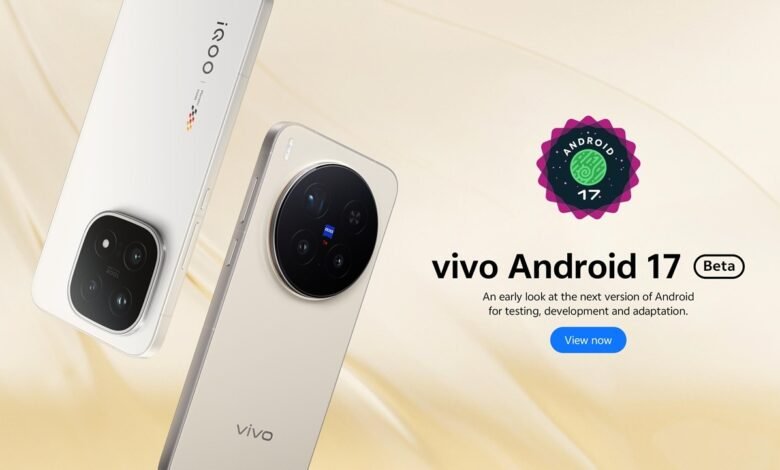
For years, Android beta testing has largely been a privilege reserved for users in a handful of countries. Now, vivo is changing that by officially including Kenya, Egypt and Tanzania in its Android 17 Beta Program for the vivo X300 Pro.
When Google announces a new Android beta, most smartphone users in Kenya and Africa can usually admire the new features from a distance. Unless you’re using a Google Pixel device imported through third-party sellers, participating in Android’s official beta program has never really been an option. Major smartphone manufacturers often restrict their beta programs to select regions in Europe, North America, China, and a few Asian markets.
Even Samsung, the world’s largest smartphone vendor, has historically kept its One UI Beta Program away from African countries. Kenyan Galaxy users often have to wait for stable releases while users elsewhere get early access to upcoming Android versions. While we occasionally see outliers like TECNO opening beta doors to the region, it’s rarely a guarantee. That is why vivo’s decision to include Kenya, Egypt and Tanzania in the Android 17 Beta program for the vivo X300 Pro is a significant and welcome shift for the local tech scene.
For users in Kenya and neighboring Tanzania, this marks a rare opportunity to officially test a future version of Android months before its public release. It’s also notable that Egypt is included, making this one of the few Android beta programs in recent years to actively support multiple African markets from day one.

A different story from Samsung and other brands
Historically, African users have had little-to-no involvement in major Android beta programs. Samsung’s One UI beta initiatives, despite their popularity, have generally remained limited to a small group of countries. The same pattern has often applied to brands such as Xiaomi, OPPO, realme, and OnePlus.
There is an important distinction for users interested in trying the beta. The Android 17 Beta Program is available for two variants of the vivo X300 Pro:
vivo X300 Pro (W20)
This is the model sold in:
- Kenya
- Tanzania
- Egypt
- Various other international markets
vivo X300 Pro (W30)
This variant is sold in a separate set of regions and also qualifies for the beta program. For Kenyan users, the key thing is that the locally available vivo X300 Pro (W20) is officially supported. That means there is no need to import a different regional model to access the beta.
The Current Beta timeline:
- April 8, 2026: vivo kicked off its Developer Preview Program based on Android 17 Beta 2.
- May 14, 2026: vivo rolled out the Android 17 Beta 3 build.
While Google just announced Android 17 Beta 4.1 for its Pixel lineup, third-party OEMs operate on their own development tracks. For now, the vivo X300 Pro remains on the Beta 3 build, but it still offers an exclusive, hands-on look at the core platform changes coming to OriginOS.
Before jumping in, it is crucial to remember that this is a developer preview. Early builds are notoriously unstable, and Beta 3 on the X300 Pro is no exception. Current known issues reported by the developer community include:
- Intermittent crashes when toggling the auto-brightness icon in the control center.
- Fingerprint unlock glitches where the icon disappears slowly or crashes back to the lock screen.
- Random device reboots when switching display resolutions from Ultra HD to HD.
How to Install the Android 17 Beta firmware
Because this isn’t an Over-The-Air (OTA) update, you will need to manually flash the firmware using vivo’s local update method.
CRITICAL WARNING: Installing developer beta firmware will trigger a complete factory reset. Back up all your personal data, files, and credentials before proceeding. Do not install firmware downloaded from unofficial third-party channels.
- Download the Firmware: Must be for the W20 model.
Visit the official vivo Developer portal and download the Android 17 Beta Program firmware package specifically designated for the vivo X300 Pro (W20).
- Transfer to Root Directory: Do not place the file inside any folder.
Connect your X300 Pro to your PC and switch the phone’s USB setting to Transfer Files (MTP). Copy the downloaded firmware .zip file directly into the root directory of your phone’s internal storage.
- Initiate the Local Update:
Disconnect the phone. Navigate to Settings > System update > Upgrade settings (usually a gear icon) > Local update.
- Verify and Install: Upgrading low-version firmware wipes data.
Select the firmware file you just copied. The system will run a quick verification check. Once cleared, tap to start the upgrade. Wait for the auto-update to complete and the device to reboot into Android 17.
If you ever need to roll back to a stable build of Android 16, you will need to manually downgrade the firmware, which will result in another full data wipe.





Join the discussion