

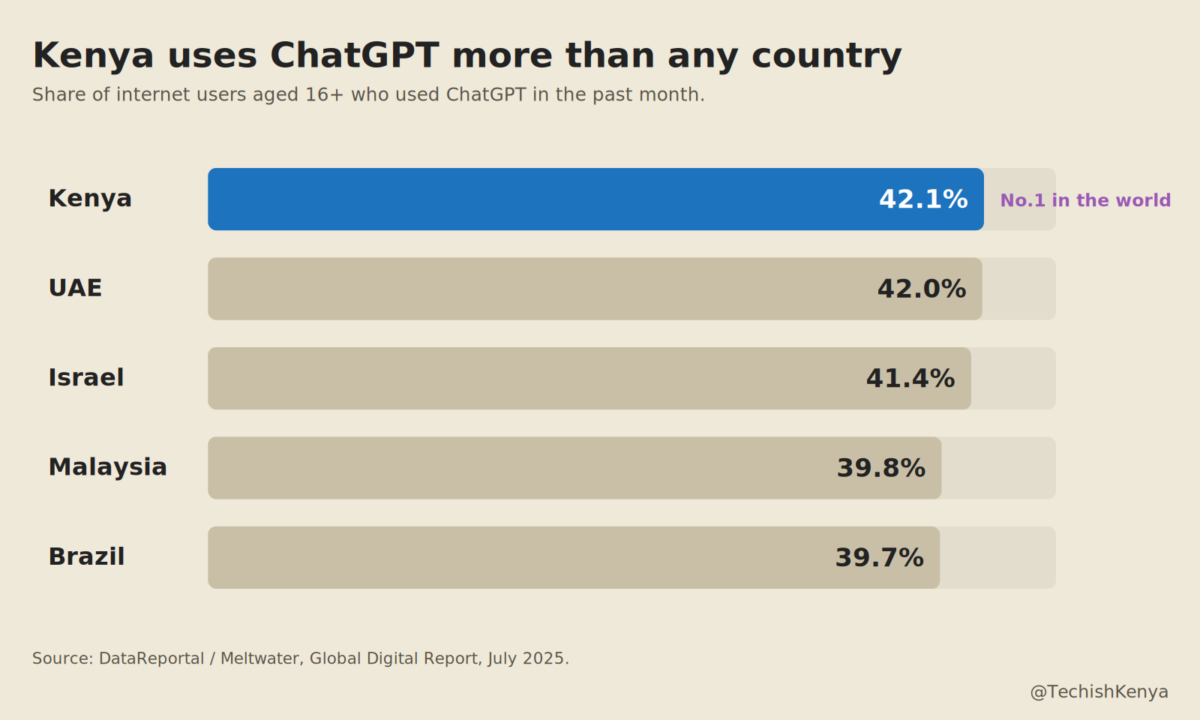
Ask most people to name an artificial intelligence tool and they will say ChatGPT. In Kenya, that reflex runs deeper than almost anywhere on earth. In the DataReportal and Meltwater Global Digital Report published in July 2025, 42.1% of Kenyan internet users aged 16 and above said they had used ChatGPT in the past month. That was the highest share of any country in the world, just ahead of the United Arab Emirates on 42%, Israel on 41.4%, Malaysia on 39.8% and Brazil on 39.7%. Kenya also placed third globally for the share of ChatGPT website traffic.
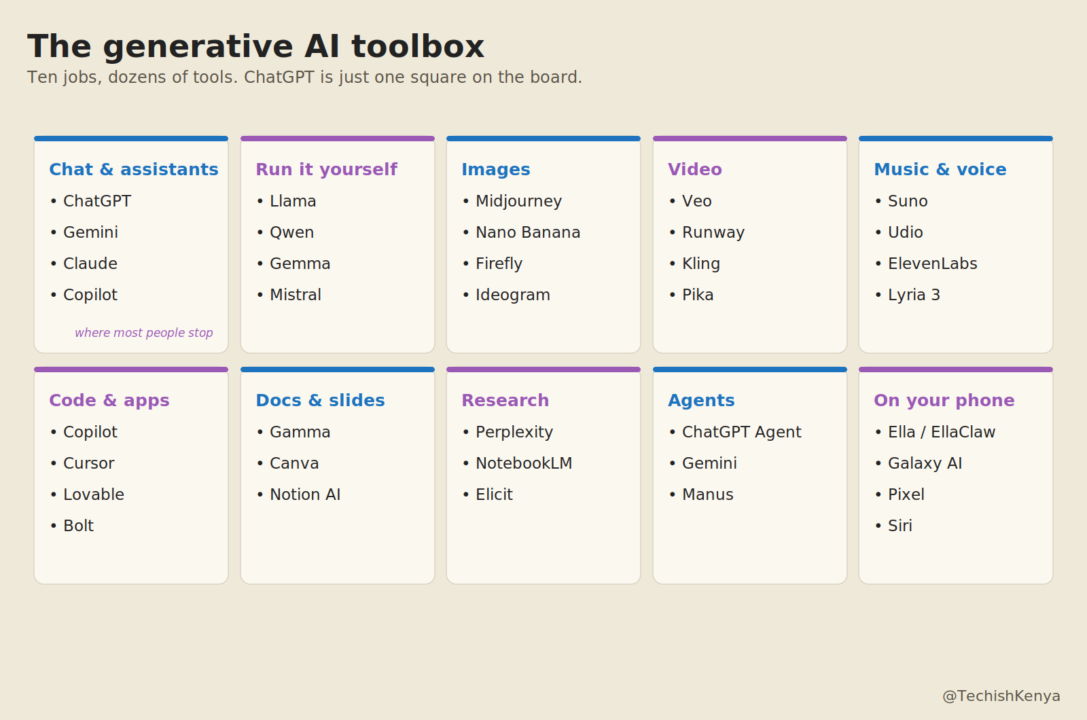
Here is the thing that number hides. ChatGPT is one tool. It is a very good one, and it is the door most people walked through. But generative AI in 2026 is a whole building, and ChatGPT is a single room near the entrance. There is now a specialist tool for almost every job you can imagine, and a surprising number of them are free.
This guide is a plain map of that building. It is not a ranking, and it does not push any single product. The aim is simpler: to show you what exists, what each thing is actually for, and where the catches are. Most of the tools below will be new to most readers, so each one comes with a one line explanation of what it does.
Why it is no longer just ChatGPT
Four shifts explain why one chat box is no longer the whole story.

The first is that specialists beat generalists. A tool built only for images, video, music, code or sourced research will usually do that one job better than a general chatbot trying to do everything.
The second is that the big assistants have different strengths. The same question put to ChatGPT, to Google’s Gemini and to Anthropic’s Claude can return noticeably different answers. Industry write ups tend to credit ChatGPT for creative range, Claude for careful reasoning and writing, and Gemini for handling images, audio and video and for slotting into Google’s apps.
The third is cost and access. Many strong tools are free, or cheaper than ChatGPT, or able to run on your own device. Nobody needs to live inside a single paid subscription.
The fourth is the big leap of 2026. Tools have moved from answering questions to doing tasks. The new wave, called agents, can browse the web, fill in forms and complete several steps on your behalf, pausing to check with you before anything sensitive.
With that in mind, here is the landscape, category by category.
The chatbots: general assistants
This is the category ChatGPT defined. These are text first assistants that answer questions, write, summarise, translate, analyse, and increasingly look at images and browse the web.
ChatGPT, from OpenAI, is the all rounder most people start with, covering writing, ideas, coding, images and voice. It has the widest set of add ons, and its weekly user base reportedly settled around 900 million in early 2026. Gemini, from Google, has the strongest free tier and lives inside Gmail, Docs, Android and Search, with very good handling of images, audio and video. Claude, from Anthropic, is favoured for long documents, careful writing and coding. Microsoft Copilot puts AI directly inside Word, Excel, Outlook and Teams, which makes it the natural fit if your work already runs on Microsoft 365.
Perplexity works less like a chatbot and more like an answer engine: every reply arrives with clickable sources, so you can check where the information came from. DeepSeek is a capable, low cost assistant with a generous free app, popular for step by step reasoning. Grok, from Elon Musk’s xAI, is tied to X and leans on real time posts, with a less filtered tone. Meta AI is built into WhatsApp, Instagram and Messenger, which is where many Kenyans already spend their time. And Le Chat, from the French company Mistral, is a European built alternative for people who care about where their data sits.
Models you can run on your own device
This category is easy to miss because there is no glossy app, yet it answers two of the biggest worries about AI: cost and privacy. These are open weight models, which means the trained model itself is published, so you can download it and run it on your own computer or server. No subscription. No data leaving your machine. It even works offline.
The main families are Llama from Meta, which has the largest community around it, Qwen from Alibaba, which is strong across more than 100 languages, DeepSeek in its downloadable form, which is competitive at reasoning and coding, Gemma from Google, which is light enough to run on a single graphics card or even a phone, and Mistral from France, often chosen for its clear licensing. There are also fast moving models from other labs, such as Kimi and GLM, and small but clever options like Microsoft’s Phi. To run any of these without being a programmer, free apps such as Ollama and LM Studio make it close to one click, and many models fit comfortably in 8 to 16 gigabytes of memory.
For most readers this will be a curiosity rather than a daily tool. It still matters, because it shows that capable AI does not have to mean a monthly bill or your data sitting on someone else’s server.
Tools that make images
Asking for a picture used to mean one thing. It now splits into clearly different jobs.
Midjourney is known for the most artistic and cinematic look, with rich texture and lighting, and it now runs on a proper website rather than only through Discord. Nano Banana is Google’s image generator inside the Gemini app, and it is fast, photorealistic and free to start. The name causes confusion, so it helps to be precise. Nano Banana is Google’s product name for its Gemini image models. The current fast and cheap default, called Nano Banana 2, is built on a model named Gemini 3.1 Flash Image and produces images up to 4K. A higher quality version, Nano Banana Pro, is built on Gemini 3 Pro and is stronger at rendering text inside an image. The older research name for this family was Imagen.
GPT Image is OpenAI’s image tool built straight into ChatGPT, and it is the easiest entry point for beginners. Note that it is not called DALL-E 4. The older DALL-E 3 was retired during 2026. Adobe Firefly is trained only on licensed and public domain images, which makes it the safest choice for commercial and client work, and it offers legal cover that rivals do not. Ideogram is the tool that finally got text inside images right, which makes it useful for posters, banners and logos with words. FLUX, from Black Forest Labs, is open and flexible and can run locally. Rounding out the set, Leonardo, Canva, Recraft and the open source veteran Stable Diffusion all serve design workflows in different ways.
Tools that make video
Text to video crossed an important line in 2026. The clips became genuinely usable, and the sound now arrives in sync with the picture.
Veo, from Google, is the strongest all rounder, combining realistic motion with built in audio, and it is available through the Gemini app and Google’s AI plans. Runway is the choice for people who want fine control, with camera moves, a motion brush and consistent characters. Kling, made by the Chinese company Kuaishou, is cheaper and strong on complex motion, which has made it popular for high volume social video. Pika is built for quick clips and playful effects. Beyond these, Luma, Hailuo and Seedance are useful for fast tests and turning a still image into video, while HeyGen and Synthesia create talking avatar videos, where a presenter reads your script in many languages, which suits training and explainer content.
One name to handle with care is Sora, from OpenAI. It was the headline act, but several 2026 reports say OpenAI is winding the Sora app down, with its developer access to follow later in the year. If you are choosing a video tool to rely on, the safer picks are Veo, Runway, Kling and Pika.
Tools that make music and voice
A full song, or a clean professional voiceover, no longer needs instruments or a recording booth.
Suno is the quality benchmark for full songs, producing vocals, instruments and structure from a text description, with tracks up to about eight minutes. Udio is a close rival, and it now operates with proper licensing after deals with Universal in October 2025 and Warner in November 2025, which gives it firmer legal footing than most. ElevenLabs is rated highest for natural sounding voices, and it handles narration, dubbing, audiobooks and voice cloning, with a music product of its own. Lyria 3, from Google DeepMind, makes music inside the Gemini app, writing lyrics and singing them, or turning a photo into a soundtrack. It is worth spelling the name correctly: it is Lyria, not Lyra. It launched on 18 February 2026, makes shorter clips of around thirty seconds, and stamps every track with Google’s invisible SynthID watermark. For voice and audio clean up there are also Murf, Resemble, Descript, which lets you edit audio as if it were a text document, and Adobe Podcast, which rescues noisy recordings.
Tools that write code and build apps
This category contains two different ideas. One is assistants that help people who already write code. The other is builders that turn a plain description into a working app, even for people who have never coded.
On the assistant side, GitHub Copilot suggests and writes code inside your existing editor and has the widest reach, with a free tier. Cursor is a code editor built around AI from the ground up and is a developer favourite. Claude Code works across an entire codebase and scores highest on a respected test that measures fixing real software issues. There are also rivals such as Windsurf, OpenAI’s Codex and Google’s Antigravity, which embed AI agents directly into the developer’s tools.
On the builder side, Lovable, Bolt, v0 from Vercel and Replit let you describe an app or a website in words and get back something that works and can be edited. These are well suited to prototypes, simple internal tools and landing pages. For a business in Nairobi that needs a quick booking page or an internal tracker, this is the part of the toolbox that has changed the most.
Tools for documents, slides and everyday work
Much of office life is repetitive, and that is exactly the part these tools now handle.
Gamma turns a single prompt or outline into a polished first draft of a slide deck, document or simple website. Canva, through its Magic Studio features, combines design, writing and image generation with the largest library of templates. Microsoft Copilot and Gemini in Workspace put AI inside PowerPoint, Word and Excel, and inside Google Slides, Docs and Sheets, which matters when the final file has to be a native PowerPoint or Google document. Beautiful.ai and Plus AI focus on smart slide layouts, and Notion AI brings writing, summarising and question answering into your notes and team documents.
Tools that research and cite
The honest weakness of a chatbot is that it can sound confident while being wrong. This category exists to fix that by showing its working.
Perplexity gives fast answers with clickable sources, and a deeper mode that writes longer briefs. NotebookLM, from Google, answers only from documents you upload, so it stays inside your own material rather than drifting, and it can even turn your notes into a spoken audio summary, which is genuinely useful for students and revision. The major assistants also offer a deep research mode, where ChatGPT, Gemini or Perplexity spends twenty to thirty minutes reading many sources and returns a structured report. For academic work, Elicit, Consensus, Semantic Scholar and Scite search and summarise peer reviewed papers and show how strong the evidence is.
Agents: AI that does the task, not just talks
This is the defining shift of 2026, and it is worth understanding clearly. An agent does not simply answer you. It takes the steps. You give it a goal, and it browses websites, clicks buttons, fills in forms and produces files, then checks with you before doing anything risky.
ChatGPT Agent runs a kind of virtual computer with a real web browser and works through a task for you, within monthly limits. Gemini’s agent, sometimes branded Spark, chains tasks across Google’s apps and is built to pause for your approval before sending or booking anything. Manus is a general purpose agent designed for the “set a goal and walk away” style of work, and it has topped independent agent benchmarks. Claude, through its Cowork and Claude Code modes, handles agentic work across files and tools, and Perplexity offers a multi step research and build mode of its own. The technology is young, and reliability still varies, but the direction is clear.
The AI already in your phone
Here is the part that matters most for everyday Kenyan users, because it is free, it is already installed, and it runs on the handsets people actually carry. Phone makers now build generative AI straight into the device. One caveat worth keeping in mind: on device AI is often a mix, with some work done on the phone and some sent to the cloud.
TECNO is the most relevant name here. Its built in assistant is called Ella, and in March 2026 the company announced EllaClaw, an on device agent that can act across your apps, for example reading and replying to WhatsApp messages, summarising videos and organising your day. EllaClaw is built on an open framework called OpenClaw and is wired into the phone at a deep level. It is part of TECNO’s “Practical AI” plan aimed at emerging markets, and the scale is real: the company says it handled more than 500 million user requests in 2025, with more than half of those in languages other than English. Its CAMON 50 series even adds a dedicated AI button and chip.
Samsung’s Galaxy AI offers generative photo editing through tools like Generative Edit, Sketch to Image and Portrait Studio, along with Live Translate, Circle to Search, writing help, the Now Bar and scam detection. It is free and built in, it leans on Gemini, and it includes a setting to keep some tasks on the device. Apple made its own move at its developer conference on 8 June 2026, unveiling a more conversational Siri now built on Google’s Gemini models, an upgraded Image Playground for generating images, and tools such as Genmoji, Writing Tools and Visual Intelligence. Apple’s images carry the same SynthID watermark, and the system mixes on device processing with Apple’s private cloud. On Google’s Pixel, an on device model called Gemini Nano powers Magic Cue, Call Notes, Voice Translate, recording summaries and the Pixel Studio image app, much of which works offline and free. Other makers, including Oppo, vivo, Honor and Xiaomi, all ship their own AI suites too. The pattern is now industry wide.
The simple takeaway: you may already own generative AI and not realise it, because it came with your phone.
Three things to keep in mind
Before you rush off to try everything, three practical points cut across the whole list.
The first is provenance. As fakes get easier to make, it helps to know that AI output can increasingly be traced. Google’s SynthID watermark is now embedded in Lyria music, Nano Banana images and, since June 2026, Apple’s Image Playground pictures. An industry standard called C2PA, or content credentials, does something similar by attaching an origin record to a file.
The second is whether a tool is safe to publish from. Not all are equal. Adobe Firefly trains only on licensed and public domain material and offers legal cover. Udio and ElevenLabs now operate with music label licensing. At the same time, dozens of AI copyright lawsuits were active in 2026, and a Midjourney case was heading to trial in September 2026. For anyone publishing commercially, this is a real consideration, not a footnote.
The third is cost, which lands differently in Kenya. Most categories have a free tier. The paid options are within reach for some: we covered how OpenAI brought its cheaper ChatGPT Go plan to Kenya at about five US dollars a month, which is roughly KES 650, against KES 2,500 or so for the standard Plus plan. Google’s AI Plus plan runs at about KES 900 a month after an introductory offer. And the on device and open weight options are free and work offline, which counts for a lot where data costs and patchy connectivity bite.
The bigger picture: a tight circle of money
It is worth stepping back from the tools to look at who builds them, because almost everything above comes from, or runs on, a small cluster of giants whose money moves in a tight loop.
Chipmakers and cloud providers invest in the AI labs, and the labs then spend that money buying the investors’ own chips and cloud capacity. Analysts have counted more than 800 billion US dollars in such arrangements across the AI supply chain by 2026. The clearest example is Nvidia, which agreed in September 2025 to invest up to 100 billion dollars in OpenAI, while OpenAI buys cloud computing from Oracle, which in turn buys chips from Nvidia, which holds a stake in CoreWeave, which supplies computing power back to OpenAI. We have already broken down that money loop between Nvidia, OpenAI and Oracle in detail.
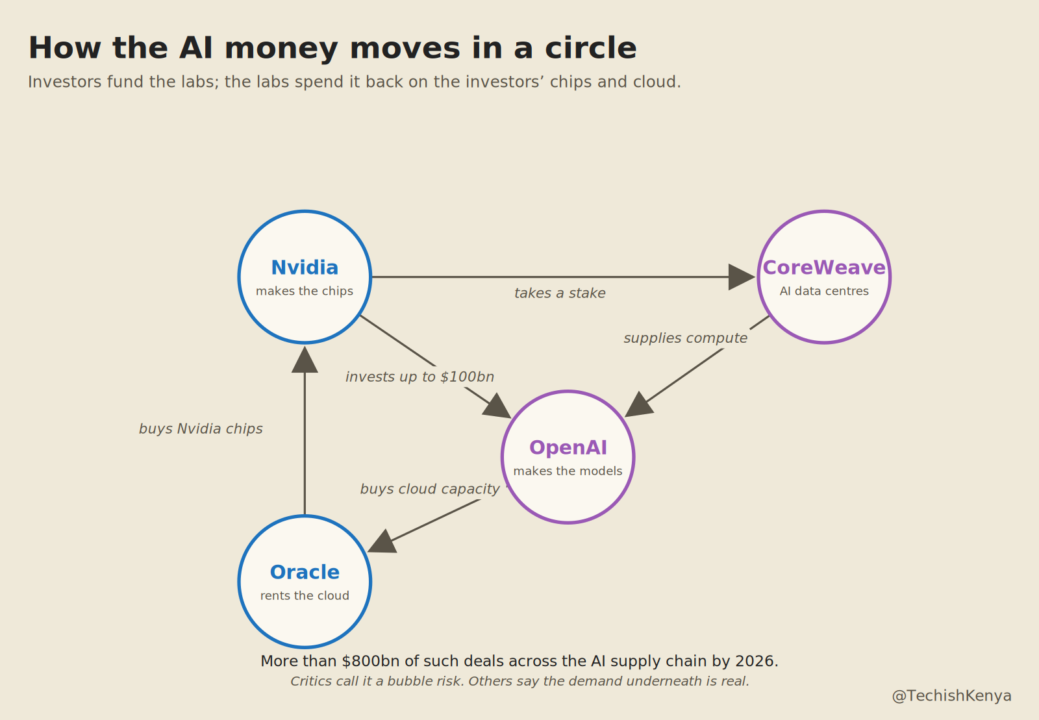
Critics hear echoes of the dot com era, when companies bought each other’s services to make growth look bigger than it was. Defenders argue the underlying demand is real, and that this kind of vendor financing has built capital heavy industries before. The economics give both sides material. OpenAI is reported to be on course to lose around 14 billion dollars in 2026, about triple its 2025 loss, on roughly 25 billion dollars of annual revenue, while projecting 100 billion dollars of revenue by 2029.
That backdrop is feeding the busiest run of technology listings in years, and 2026 is shaping up as the most AI heavy year for stock market debuts on record. SpaceX, which now includes Musk’s xAI, has already gone public. It listed on the Nasdaq on 12 June 2026 under the ticker SPCX, raising about 75 billion dollars in the largest stock market debut in history, comfortably ahead of the previous record held by Saudi Aramco. The shares jumped on the first day and pushed the company’s value above 2 trillion dollars, which on paper briefly made Elon Musk the world’s first trillionaire. Anthropic has filed confidential paperwork and could list as early as October, and OpenAI is weighing a listing that could value it near a trillion dollars, although its finance chief has cautioned it may take a while. Chip firm Cerebras listed in May 2026, CoreWeave went public in 2025, and the data company Databricks is also in the frame.
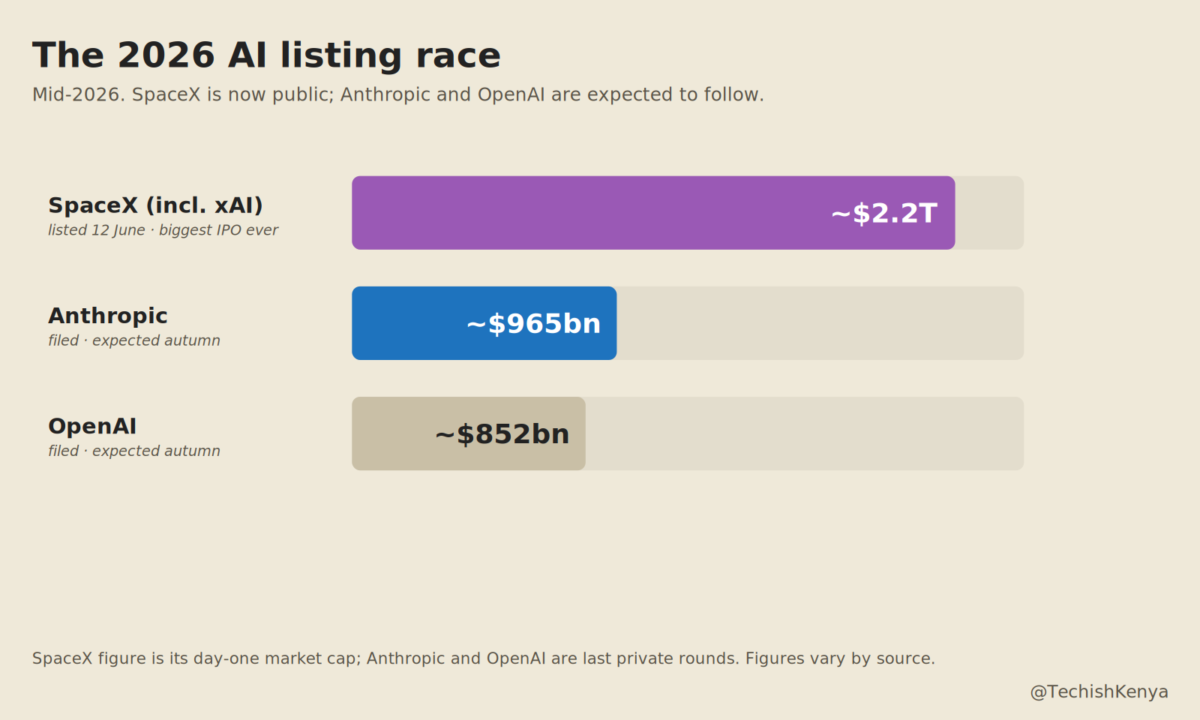
There has also been a quiet change in the pecking order. By mid 2026, Anthropic was valued at roughly 965 billion dollars after a large funding round, edging past OpenAI’s private valuation of about 852 billion dollars, reportedly the first time any company had passed OpenAI on that measure. As one recent illustration of the moment, in June 2026 SpaceX agreed to buy Cursor’s parent company, Anysphere, in a deal reported at about 60 billion dollars, even though Cursor largely runs on rival companies’ models. None of this is a verdict on whether the boom is healthy. It is the context: powerful tools, and a business underneath them that is still unsettled.
So which tool should you use?
The practical lesson is simple, and it does not require picking a side in the bubble debate. You do not need to marry one tool and stick with it. Work out the job first, then reach for the tool built for that job. Want a song, try Suno. Want a poster with text on it, try Ideogram. Want sourced answers for a school assignment, try NotebookLM or Perplexity. Want to edit a photo without learning Photoshop, the AI on your phone may already do it.
Most of these tools have a free tier, so the cost of trying three of them is your time, not your money. Start with the job you actually have this week, test a couple of options side by side, and keep the one that fits. And keep half an eye on the business behind your favourite tool, because in a year of huge valuations, buyouts and stock market debuts, the company you depend on today may look very different by the end of the year.





Join the discussion