
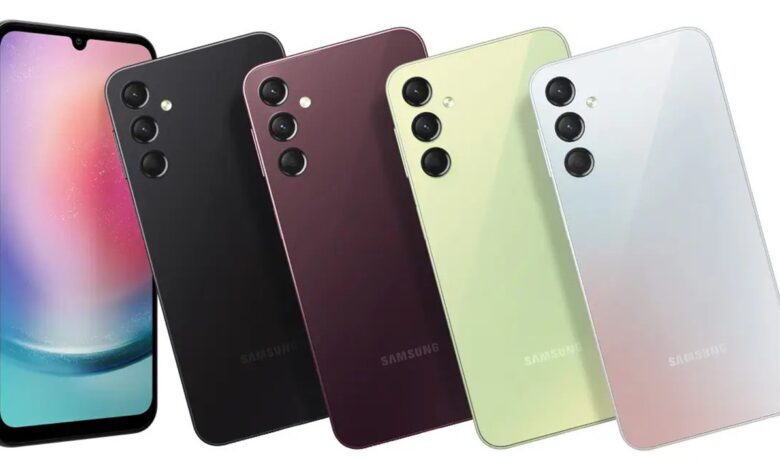
The Samsung Galaxy A series remains a massive hit in Kenya, and if you own the Galaxy A24, we’ve got exciting news for you. Samsung has officially kicked off the One UI 8.5 update rollout for the budget powerhouse. While the update is currently rolling out to users in South Korea, the global model (SM-A245F) should join the party very soon.
Launched in 2023 with Android 13, the Galaxy A24 made waves as Samsung’s first budget phone to guarantee four major OS upgrades and five years of security patches. With One UI 8.5 finally arriving, you are still well in line for the highly anticipated Android 17 and One UI 9 update down the road.
For the Korean market, the One UI 8.5 update arrives with firmware version A245NKSU9FZF1 and bundles the May 2026 security patch. Because the global models already bagged the May security update earlier this month, you will likely receive the One UI 8.5 upgrade with an unchanged security patch level.
So, what should you expect when the notification drops? Samsung is packing a flurry of enhancements into One UI 8.5.

Visually, the interface feels deeply personalized. It boasts transparent blur effects and a floating format that creates an intuitive, distraction-free design. You’ll also be able to download interactive wallpapers and dynamically customize your watch’s lock screen to match the font thickness of your background.
Functionality gets a major boost, too. The weather widget now charts precipitation graphs and introduces a pollen index for seamless allergy management. Communication is handled better thanks to Direct Voice Messages, which automatically save voicemails to your phone for quick playback anytime. Your day also starts smarter, with an alarm clock that displays the current weather directly in the background.
Under the hood, One UI 8.5 supercharges the Galaxy A24’s connectivity. From an upgraded auto-hotspot for easy family sharing to Quick Share settings that restrict transfers strictly to your own logged-in devices, control is entirely in your hands. Health and security aren’t left behind either; Samsung Health now integrates mindfulness reports, while Knox Matrix actively monitors your overall device security status.
Here’s the full Galaxy A24 One UI 8.5 changelog (translated from Korean using Google Translate):
Visual design
- A New visual that transforms everyday life: One UI offers a more meaningful, personalized experience in daily life, allowing you to enjoy a more refined design experience.
- Enhanced usability: The depth added by the transparent blur effect helps make content easy to understand, and the floating format provides necessary elements according to your usage context.
- Intuitive data visualization: The interface is designed to help users focus on what matters most through user-friendly and clear data presentations.
New camera features
- Filters added: Three new camera filters have been added to enhance your photos with vivid, film-like effects.
Home and lock screen
- Interactive new wallpapers: You can now download new wallpapers featuring interactive elements. To save storage space, you can choose to download only the specific wallpapers you need.
- Enhanced watch lock screen options: Custom options have been expanded to allow you to personalize your watch layout in more diverse ways. You can now manually adjust the font thickness to perfectly match your chosen background image.
Weather
- Improved weather widget: You can now quickly check precipitation information directly from the home screen widget. When rainfall is forecasted within a few hours, it is dynamically displayed as a graph inside the widget.
- Pollen Index: Pollen index information has been newly integrated. By checking the specific indexes for trees, grasses, and ragweed, you can effectively manage your seasonal allergies.
Communication
- Direct voice messages: When you cannot answer an incoming call, if the other party leaves a voice message, it is saved directly to your phone so you can quickly listen to it at any time.
Clock
- Weather alarm backgrounds: Start your day by checking the current weather instantly. To provide an intuitive look, the current weather conditions are displayed in the background when your alarm goes off.
- Time zone conversion: Easily compare multiple time zones at once. In the Clock app, you can intuitively check the time differences between various cities using a built-in slider.
Connectivity
- Upgraded automatic hotspot: Sharing your phone’s internet connection with more people is now easier. You can automatically share it with family members linked to your Samsung account or create dedicated hotspot sharing groups to share with anyone you want.
- Family device sharing: Share files, screens, and more with your family to enjoy a variety of connected experiences. Features like Quick Share, Auto Hotspot, and Multi-Control are seamlessly available across your family’s Galaxy devices.
- Quick smart view connections: Connect to your frequently used displays much faster. You can now add shortcuts to your home screen to mirror your phone screen directly onto your TV or other external displays.
Quick Share
- Share only on my device: Enhanced privacy controls allow you to restrict files so they can only be sent between devices logged into your personal Samsung or Google accounts.
Samsung Health
- Comprehensive health weekly report: Track weekly health changes with aggregated data. Medication intake and mindfulness/meditation data can now be checked directly within the weekly summary.
- Upgraded workout sharing experience: Add your own personality when sharing your workout history. You can combine your workout photos and records to create the perfect stylized image for social media.
- Meditate with your watch: You can now launch meditation sessions directly from your Galaxy Watch. Access your favorite sessions or view recommended meditations on either your phone or watch.
- On-watch antioxidant measurement: The Galaxy Watch has been upgraded to measure your antioxidant index directly from the wrist at any time, even when disconnected from your phone. (Note: This feature is available on Galaxy Watch8 and Galaxy Watch Ultra).
Battery and power
- Battery information screen improvements: Accessing your battery metrics is now much more efficient. You can easily check your current battery level, charging status, battery protection configurations, and daily usage statistics from both the past week and the current week all on a single screen.
- Customizable power saving modes: Turning on power saving mode extends your battery life efficiently. In the default sleep mode, you can manually set specific restrictions to save power, or select the Ultra Power Saving mode to disable all non-essential functions to maximize remaining battery life.
Security and privacy
- Stolen device protection: Enable the authentication failure lock feature to further safeguard your information if your phone is lost or stolen. If too many incorrect attempts are made to unlock the device via fingerprint, PIN, pattern, or password, the screen will automatically lock down. Identity authentication now protects more settings than before to enhance baseline security.
- Temporary auto-blocker disable: If you need to temporarily turn off the automatic security risk blocking feature, you can set it to automatically re-enable itself after 30 minutes. This ensures your device stays protected from security threats even if you forget to turn it back on manually.
- Device security status check: Monitor the security health of all your connected devices to ensure safe usage. Powered by Knox Matrix, the system checks your overall security status and immediately notifies you if any software updates are required. (Note: This feature is only available on supported devices logged into your Samsung account).
Accessibility
- Enhanced keyboard/mouse magnification: The zoom area is now significantly more stable when utilizing a physical mouse or keyboard. When shifting focus using the keyboard, the large zoom area moves reliably along with your typing or navigation. When using a mouse, you can adjust the zoom area to dynamically follow pointer movements toward the edge of the screen.
- Separated pointer actions: The pointer settings have been separated into two distinct automatic actions based on situational needs: “Automatic action after stopping” and “Corner operation.” Automatic actions allow the mouse to perform a manually pre-set action when the pointer dwells in place for a certain period. For corner operations, you can assign separate, unique actions to trigger whenever the mouse hits any of the four corners of the screen.
Other enhanced features
- Flexible quick settings editing: Editing the Quick Settings window is now much more adaptable. You can freely add items you need, delete icons you rarely use, move frequently accessed toggles to the front, and place every item exactly where you want it.
- Advanced reminders: Set early notifications for your reminders so you never miss important tasks. You can now choose exactly how early you want to receive an alert for each individual reminder.
- Tables in Samsung Notes: Use the new insert table feature to neatly organize your notes. You can freely customize column widths, colors, and border designs. An integrated automatic calculation feature reduces manual work to boost overall productivity.
- Rebuilt new tab page (Samsung Internet): The tab page has been redesigned so that opening a new tab in the Samsung Browser allows faster access to websites and essential features. On this new tab page, you can check open tabs from your other devices as well as your current web security status.
- Smart calculator improvements: Features have been enhanced to help you input formulas quickly using clipboard recommendations, making calculations faster and simpler. When you open the Calculator app, it dynamically detects numbers and formulas saved to your clipboard for immediate one-tap input.





Join the discussion