
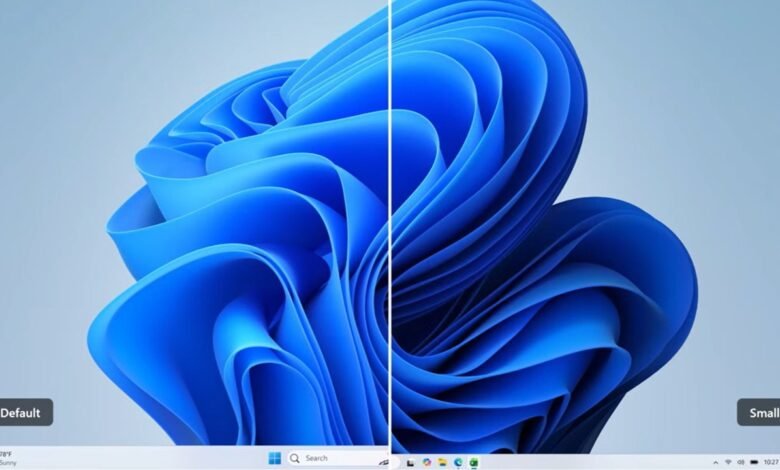
For years, one of my absolute biggest pain points with Windows 11 has been the unresizable Taskbar. It was a simple UI luxury we enjoyed in previous Windows iterations, allowing us to tweak our desktop real estate to our exact liking. Yet, when Windows 11 launched, Microsoft inexplicably removed it, leaving power users like myself frustrated.
This is me ranting on Twitter back in 2021 about the option to resize the Taskbar in Windows 11:

Well, Microsoft has finally listened and is officially bringing back the ability to resize the Taskbar. Currently, the feature is rolling out to testers in the Windows Insider program via Experimental Build 26300.8758.
What’s new in the latest Insider build?
Microsoft has quietly tucked this feature into the latest release. According to the official Windows Insider Blog, the changelog explicitly highlights taskbar resizing as a notable new feature, and here’s how Microsoft describes it:

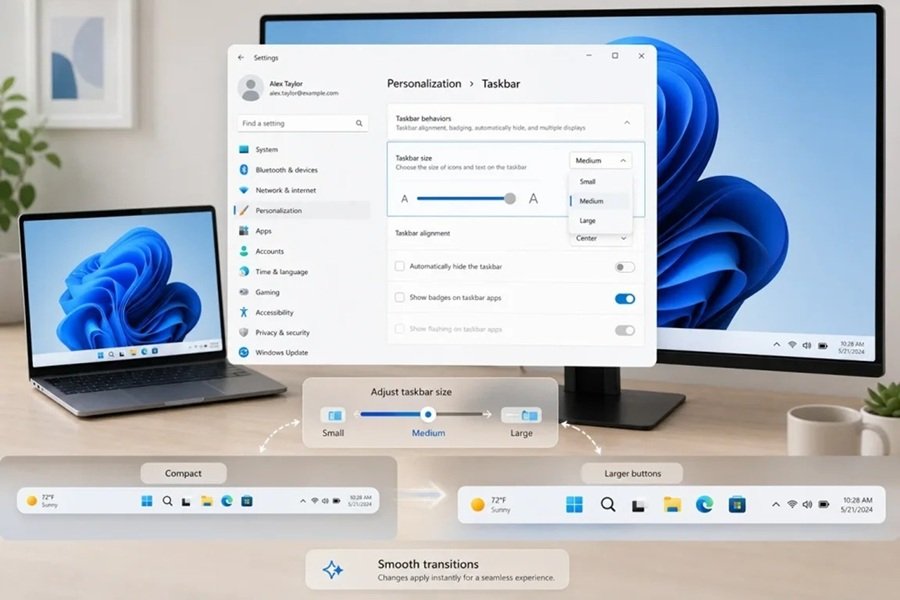
Taskbar customization just got easier. As we continue to make improvements to the Taskbar experience mentioned last month, we’ve introduced a dedicated Taskbar Size setting, making it simpler to find, understand, and personalize your ideal taskbar experience.
How to resize your Taskbar on Windows 11 right now
If you are a Windows Insider running the Experimental Build, you don’t have to wait to reclaim your desktop space. You can tweak your Taskbar size immediately using one of two simple methods:
Method 1: The Settings app
- Open your Settings app.
- Navigate to Personalization.
- Click on Taskbar.
- Expand the Taskbar behaviours menu.
- Look for the new Taskbar size dropdown and select your preferred layout (e.g., Small, Default, Large).
Method 2: The right-click shortcut
For an even faster route, right-click a space on your Taskbar and select Taskbar settings. This will take you directly to the customization page where you can adjust the size instantly.
Because this feature sits in the Experimental channel right now, standard Windows 11 users will have to wait just a little longer before the update hits their daily drivers. However, we have direct confirmation that a broader rollout is on the horizon. March Rogers, Partner Director of Design at Microsoft, recently addressed the feature’s return, stating:
The feature is in our Windows Insider builds at the moment. Will be rolling out to all devices after we've done some more testing.
As someone who has been waiting for this exact update for years, I consider this a massive win for Windows 11 customization. Microsoft is finally acknowledging that when it comes to PC workflows, one size definitely does not fit all.





Just started with win 11 a couple of months ago, and this has reduced my efficency with 5-10%. But read that this new update will not expand/make task bar bigger – only smaller?
I can\’t believe this is happening. Hallelujah!