

I was seated in a tuk-tuk recently when I overheard a small but familiar frustration. A passenger was trying to pay the rider’s Pochi la Biashara number using Airtel Money, but it just wasn’t going through. “Airtel doesn’t support Pochi,” he said, half convinced, half annoyed.
I stepped in (vile inafaa).
Because while that assumption feels true inside the My Airtel app, it’s not the full story.
Over the past year, I’ve noticed that Airtel has technically positioned “Send to Pochi la Biashara” as part of the Send Money tab in the app.

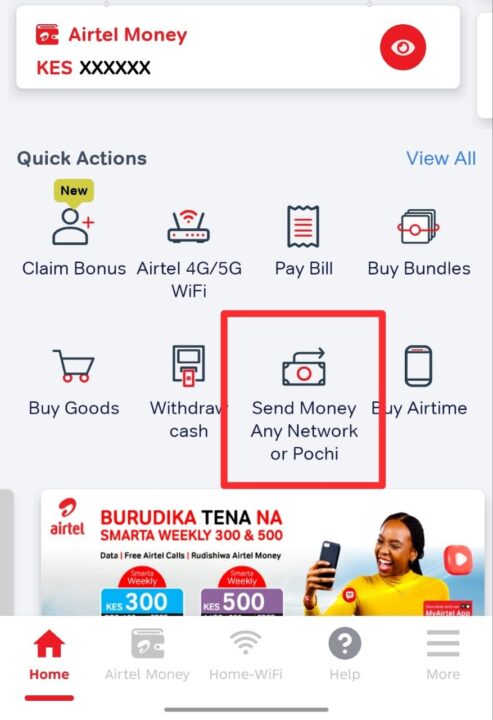
But in practice, it doesn’t behave as expected. Unlike platforms like My OneApp where Pochi transfers are clearly separated and functional, the Airtel Money app only shows options for sending to personal numbers locally or internationally. No clear, reliable workflow for sending money to Pochi appears.
So what actually works?
USSD. Not the app.
Since 2025, Airtel has been gradually working on deeper integration, but until that is fully stable, the most reliable method remains using the USSD *334#.
How to send money from Airtel Money to Pochi la Biashara
- Dial *334# on your Airtel line
- Select Send Money
- Choose Send to M-PESA Pochi
- Enter the Safaricom Pochi number
- Confirm and complete the transaction as usual
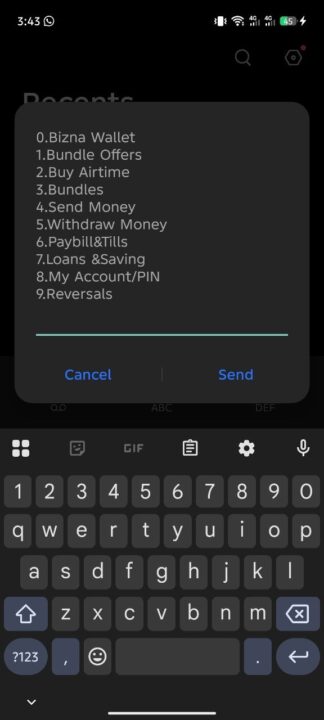
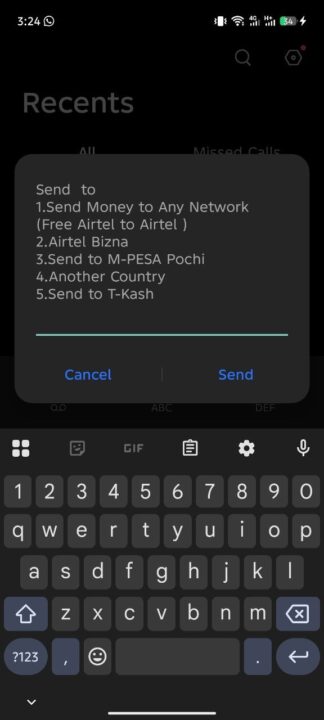
That’s it.
When I guided the tuk-tuk passenger through this exact process, the transaction went through instantly. The relief on his face was immediate. What felt like a “system limitation” turned out to be just a hidden pathway, so hopefully this helps you as well.
Until Airtel fully refines Pochi support inside the My Airtel app, the USSD *334# remains the only dependable bridge between Airtel Money and Safaricom’s Pochi la Biashara ecosystem.






Thank you for this!!!!