

You pay a boda rider through your phone and move on with your day. Then your phone rings. It is the rider, asking you to support his harambee. Or you tip a shop attendant, and a week later she texts asking you to help with her children’s school fees. Nothing threatening happened. But someone you met once now has your full name and your phone number, and they got both from a payment you had no way of making privately.
Safaricom says complaints like these are exactly why it changed what happens after you send money. The company published a video explaining the change. In it, Sharon Holi, its Head of Customer Privacy & Data Protection, puts the problem simply: “When I send money to somebody, when I tip somebody, when I pay for my bus fare, I don’t want that person to know my number.”
That change, which we explained in detail in March, is the doorway into a bigger subject: what data Safaricom actually holds on you, who can see it, and what the law lets you do about it.
Why is the M-PESA name hidden now?
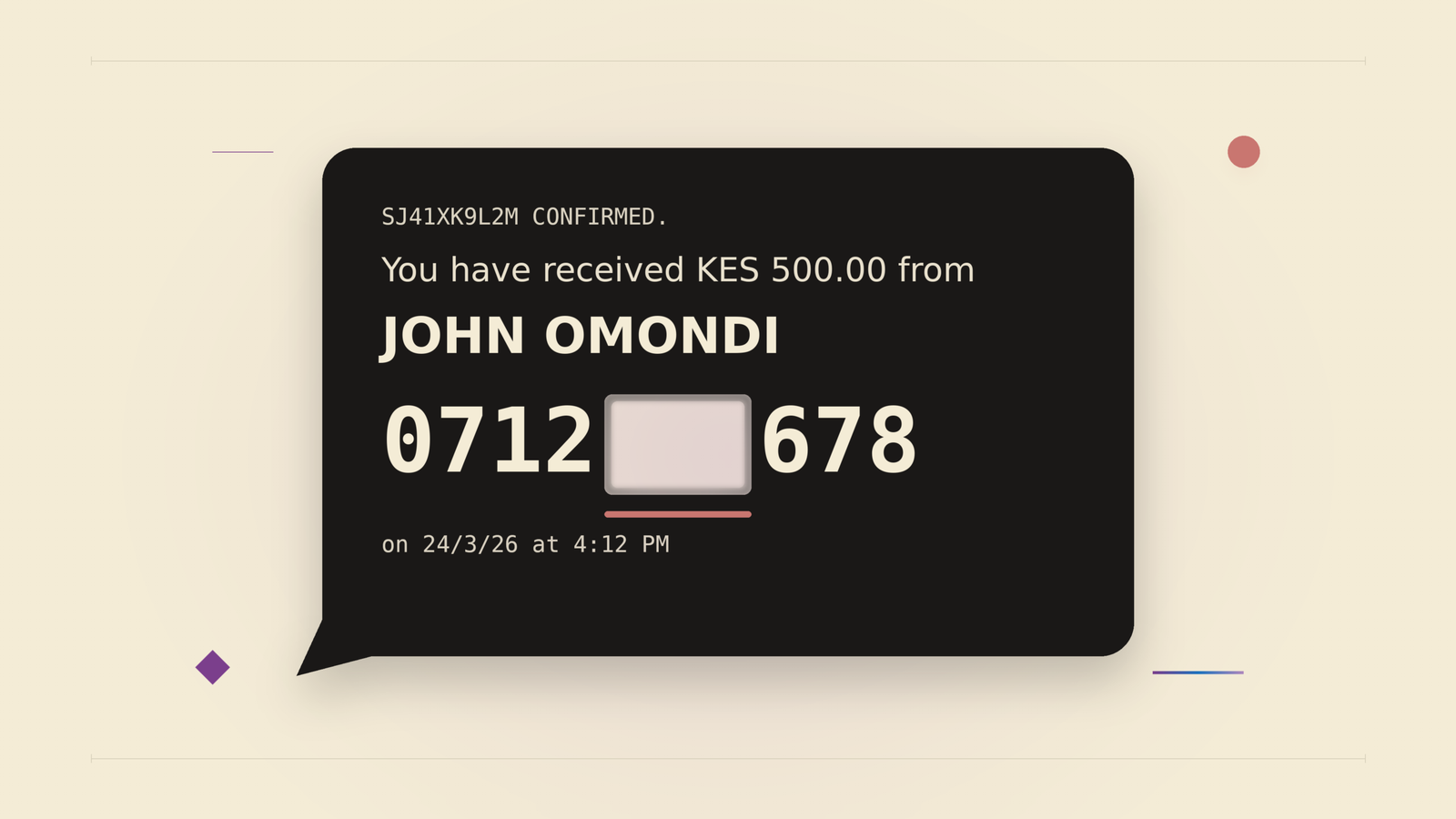
Since 24 March 2026, three things happen when you send money to another person on M-PESA. The recipient sees only your first and last name as they appear on your ID, not all your names. The middle digits of your phone number are masked, meaning hidden, so the recipient cannot simply save your number and call you. And if the recipient wants your full details, they have to ask.

Masking has limits worth knowing. It applies to person-to-person transfers on M-PESA. As we reported in March, money arriving from a bank, or from another network like Airtel Money or T-Kash, does not carry the same protection.
This did not appear from nowhere. Safaricom’s privacy changes have run in stages. Pochi la Biashara started hiding customer numbers from business owners in 2020. Staff access to customer data was restricted in 2021, and M-PESA statements were trimmed in 2022. Through 2023 and 2024, the systems merchants use to receive payments had customer details limited too. The full M-PESA timeline is a story on its own.
The volumes involved are large. Safaricom CEO Peter Ndegwa puts it at “150 million transactions a day” in the company’s video.
What is 334 on M-PESA?
334 is how the asking works. If someone needs your full details after you pay them, they forward the transaction SMS to 334. Safaricom then sends you, the sender, a consent request, and you approve or decline. The request is valid for 24 hours, and each transaction allows one request. The choice sits with you, not with whoever received your money.
What does Safaricom actually know about you?
More than most people assume, and it is all listed in the company’s official Data Privacy Statement. In plain language, Safaricom holds:
- Your identity details: name, ID number, date of birth, address and photograph.
- Your call and SMS records: who you called or messaged, and when. Engineers call this metadata. Safaricom logs that a call happened, not a recording of what you said.
- Your M-PESA history: every payment, deposit and withdrawal.
- Your approximate location: your phone constantly talks to the nearest masts, which places you in an area.
- Your device details: handset model, tariff, top-ups.
- Biometrics, if you have opted into services that use them: your voice print from Jitambulishe, Safaricom’s voice identification service, or your fingerprint where used.
None of this is unusual for a telecommunications company. Any network you use holds a similar file. The difference is in what happens to that file next, and Kenyan law now has a lot to say about it.
Who does Safaricom share my data with?
Safaricom’s privacy statement lists five categories of recipients: law enforcement agencies, regulators and courts acting under a lawful mandate, credit reference bureaus, fraud prevention agencies, and emergency services. The credit bureau, fraud prevention and emergency services sharing is routine, tied to running a bank-linked mobile money service and to catching fraud. The law enforcement and regulator category works differently, and it’s the one Safaricom has addressed directly. Its October 2024 position statement says it does not hand over customer data “unless explicitly required of us via a court order.”
Access is also tightening in ways you may have already felt. As we reported in March, getting your own full, unmasked M-PESA statement now requires a police OB, the Occurrence Book entry you record at a police station. That is an extra step for you, but it also stops anyone else from pulling your statement.
What can you ask Safaricom to show, fix or delete?
Kenya’s Data Protection Act of 2019 gives you rights over your data that few people ever use. You can ask to be told what is held about you and to see it. You can ask for it to be corrected. You can object to how it is being processed. And you can ask for deletion, particularly where data is false, misleading or no longer needed.
You do not need a lawyer to use these rights. Write to dpo@safaricom.co.ke with your name, ID number and phone number, and say what you want: a copy of your data, a correction, or a deletion.
One clarification, because it comes up often: deleting an app does not delete your data, on any service, anywhere. Uninstalling M-PESA or My OneApp removes the app from your phone. Your account data is governed by law and retention rules, and deletion is a request you make under the Act.
The habits that close the loop
Safaricom can mask your number and courts can fine companies, but neither helps if your own setup hands a fraudster the keys. An ID card tucked behind your phone cover, plus your SIM, plus a PIN that is your date of birth is a complete fraud kit in one pocket.
So, the short list. Don’t use your date of birth as your PIN. Don’t keep your ID behind your phone cover. Don’t write your PIN down and store it behind your phone. Never give your PIN to anyone who calls you, no matter who they claim to be; genuine Safaricom calls come from 0722000000 only, and no genuine agent ever asks for a PIN. If a scam text reaches you, forward it to 333 so Safaricom can act on it.
Then dial *100*100# once from your Safaricom line. After that, your SIM can only be replaced at a Safaricom Shop or Care Desk with your ID, or by calling Safaricom yourself. That makes SIM swap fraud, where a criminal gets a replacement copy of your SIM issued to themselves and takes over your number and M-PESA account, far harder to pull off remotely. We have written about SIM swap fraud since 2022.
My OneApp adds two safeguards of its own, according to Safaricom. The first involves mini apps, the small services that run inside the main app. Ziidi Trader, the mini app for buying shares at the Nairobi Securities Exchange, is one example. Before money moves inside a mini app, you have to enter your PIN again. The second: if your SIM is removed and reinserted, the app locks until you prove it is you. The extra step is deliberate. It stops someone holding your phone from moving your money.
What to do this week
The practical takeaway is short. Dial *100*100# today. Remember that 334 exists the next time you need to know who sent you money. And if you have ever wondered what Safaricom holds on you, one email to dpo@safaricom.co.ke gets you a copy.
Share this with someone who uses M-PESA: Never share your M-PESA PIN. Your birthday is not a PIN. No ID or written PIN behind your phone cover. Dial *100*100# to block SIM swap fraud. Forward scam texts to 333. Safaricom only calls from 0722000000.



Join the discussion