
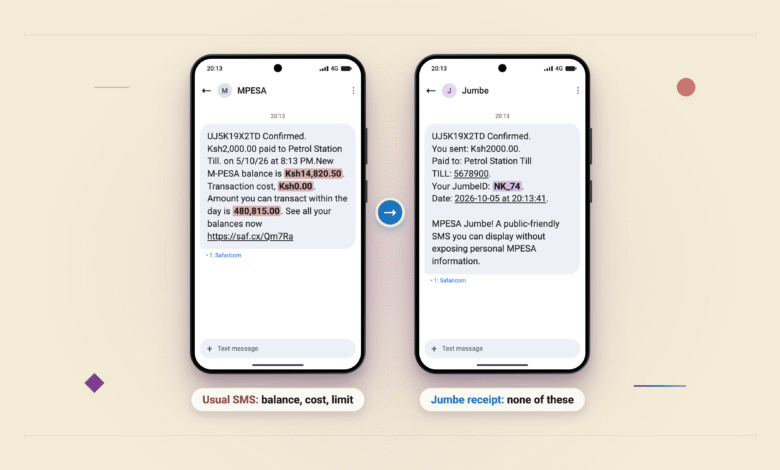
An attendant asking “Nionyeshe message”, or “show me the message”, often has the same problem as you: they need to confirm a payment, but the notification went to the business owner’s phone. So they call the owner or ask to read your M-PESA SMS, which also shows your balance.
M-PESA Jumbe lets the owner nominate staff to receive payment alerts on their own phones. The attendant can then check that you’ve paid without calling someone elsewhere or asking to see your screen. Safaricom says businesses using Lipa na M-PESA and Pochi la Biashara can add up to 50 additional people to receive these notifications.
Earlier this month, we explained why some customers receive two SMS messages after paying at a Till. One is the usual M-PESA confirmation. The other is a Jumbe receipt that leaves out your balance, so you can show it at the counter. The staff alerts are part of the same service.
For an owner using Pochi la Biashara, the M-PESA service small businesses use to collect business payments on a personal line, this means being able to leave the shop with their phone. Employees can keep confirming payments while the owner is away.

What staff can see
A staff alert has the transaction reference, amount, business name, payment number, date and time. The customer’s full name and phone number are replaced by a JumbeID, made from their first and last initials and the final two digits of their phone number. Nancy Kamau, whose number ends in 74, appears as NK_74 in Safaricom’s example.
Two customers can have the same JumbeID. Staff need to check the transaction reference, which distinguishes their payments even when the initials and digits match.
These alerts don’t give staff access to the owner’s balance, PIN, statement or transaction history. For Till and Paybill accounts, Safaricom’s Split Notifications FAQ also confirms that the owner’s main number continues receiving the full standard M-PESA notification.
If an attendant still needs to see your receipt, you can show the Jumbe SMS. It has no balance, full name or full phone number. You don’t need to register for it: the separate receipt arrives alongside your usual M-PESA SMS when you pay a business that has activated the feature.
How merchants add staff
Merchants nominate recipients through the M-PESA Jumbe menu on *234#. Each person gets an invitation and must accept before the alerts start. The service uses SMS and USSD, the dialled phone menus that work without mobile data, so staff can use a basic phone.
For Till and Paybill accounts, the FAQ says recipients must have active personal Safaricom numbers registered on M-PESA. Each Till or Paybill number can have up to 50 recipients. Anyone whose alerts have been suspended still counts towards that limit; removing them frees a place.
Owners can remove people when they leave the business. Staff can also pause their own alerts while off shift or opt out through the USSD menu. If they opt out, the merchant has to nominate them again and they must give fresh consent before receiving alerts.
The alerts depend on the mobile network, and Safaricom doesn’t guarantee an SMS delivery time. Staff may therefore have to wait for a delayed message before they can confirm a payment.






Join the discussion