

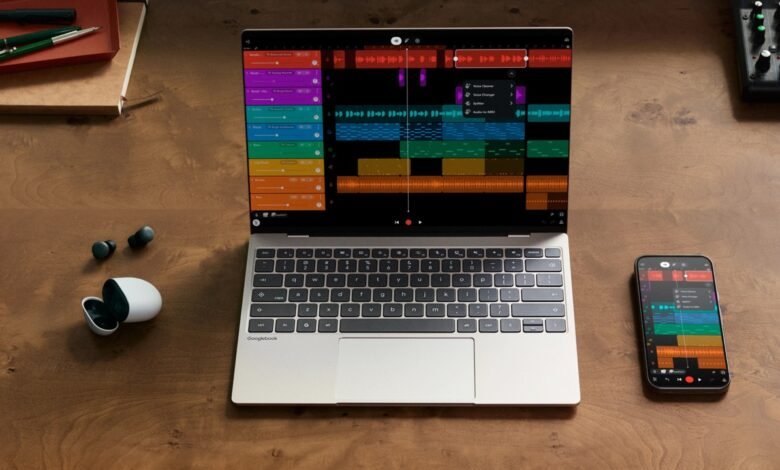
Samsung looks to be working on two laptops that run Android, and the evidence sits in its own software. On 18th November 2026, Samsung opened the One UI 9.5 beta to Galaxy S26 owners in six countries. Inside it are references to two devices called “origin14wifi” and “origin16wifi”. The code around those names points to a 14-inch and a 16-inch laptop, both Wi-Fi only, with Qualcomm’s Snapdragon X Elite chip.
One UI is the software Samsung puts on top of Android on its Galaxy phones and tablets. Earlier today we covered what the beta changes on the S26. The laptop references turned up when the beta’s apps were unpacked and read line by line. This is unfinished test code, so names and details can still change, and none of it is an announcement.
Google’s Android laptops launched without Samsung. In May, Google announced the Googlebook, a laptop that runs Android with the desktop parts of ChromeOS on top. The first ones come from Acer, ASUS, Dell, HP and Lenovo. When pre-orders opened in September, they started at USD 899, or about KES 117,000. Samsung, which already makes Galaxy Chromebooks, wasn’t one of the five. Asked about the missing Samsung logo in a May interview, Google vice president John Maletis said the five makers’ logos were “for our launch window” and that “you should expect more logos over time.” So if you’ve been waiting on a Samsung laptop, the question is whether these two are Googlebooks, and if not, what they are.
What the code says about the two laptops
The codenames carry the screen sizes. Samsung’s Settings app has a separate set of screen zoom levels for origin14 and a lower set for origin16, which fits a 14-inch and a 16-inch screen. Those are the two sizes of Samsung’s Windows laptop, the Galaxy Book6 Pro.

The “wifi” on the end is the tag Samsung uses for its Wi-Fi-only tablets, and one of Samsung’s apps lists the two laptops right beside those tablets. So neither laptop appears to take a SIM card for mobile data. Samsung’s Reminder app even carries a warning written for them: “This laptop doesn’t support location-based reminders.”
The code also seems to get them ready for offices. When One UI detects either laptop, it appears to switch on Android’s device admin and managed users features, which handle work profiles, several people sharing one machine, and company IT departments managing a fleet.
Then the chip. Samsung’s Video Editor app has a new profile for the Snapdragon X Elite X1E-80-100, labelled “Origin”. The Snapdragon X Elite is Qualcomm’s laptop chip. It’s built on Arm, the same chip design phones use, and it’s the one inside the Dell XPS Googlebook and the HP Googlebook 14. Geekbench, a benchmark app that uploads its results to a public database, points the same way. On 2nd October, a Samsung device listed as XE940XSA ran Geekbench on Android 17 with a 12-core Qualcomm chip: four cores at 3.42GHz and eight at 4.01GHz. That matches the X1E-80-100, which Qualcomm rates at 3.4GHz across all 12 cores with a boost to 4.0GHz.
XE940 is one of two model numbers in the beta, along with XE960, and the numbers say which family the laptops belong to. Samsung’s Windows laptops start with NP, as in the NP940XJG, the 14-inch Galaxy Book6 Pro. Its Chromebooks usually start with XE, as in the XE550XGA, the Galaxy Chromebook Plus. The 940 and 960 are the numbers the 14-inch and 16-inch Galaxy Book6 Pro use, which fits the 14 and 16 in the codenames. The XE puts them with Samsung’s Chromebooks, the laptops that run Google’s software. Samsung has never explained its model numbers, so that last part is what we think the pattern means.
There are hints that the 16-inch one has a touchscreen. The Video Editor gives the XE960 tablet-style layouts, and Samsung’s S Pen software adds a screen rotation fix for it, the kind it applies to two of its foldables. That doesn’t mean the laptop works with the S Pen. Every Googlebook on sale so far has a touchscreen.
Googlebook or a Samsung laptop of its own
Samsung’s code doesn’t use the word Googlebook, and it doesn’t mention Aluminium, Google’s internal codename for the software underneath Googlebooks. Samsung’s strings just say “laptop”, and the laptop’s About page lists a One UI version next to the Android version. In the beta, the word Googlebook only shows up in Google’s own apps.
There are two ways to read that. In April, a report said Samsung was building three Galaxy Book laptops on Android, at low, mid and flagship prices, with One UI and an improved version of DeX, the desktop mode Galaxy phones already have when you plug them into a monitor. That would be Samsung doing its own thing. The other reading is a Googlebook with One UI on top. One UI calls Samsung’s own devices “phone” and “tablet” without brand names, so a plain “laptop” proves little. The XE prefix fits either way, since both would run Google’s software.
We think the badge matters less to buyers than what comes with it. A Googlebook comes with Google’s promise of up to 10 years of updates and its phone features: casting phone apps to the laptop, opening the phone’s files from the laptop’s file manager, and picking up on the laptop what you started on the phone. If Samsung goes alone, the update promise would be Samsung’s to make, and we’d want to know whether those phone features come too.
Samsung hasn’t named the laptops, priced them or given a date. We expect One UI 9.5 to arrive with the Galaxy S27 early next year, and if the laptops ship with it, that’s the earliest window we’d look at. If your Galaxy phone runs One UI 9, you don’t have to wait for Samsung to get a laptop that works with it, at least where Googlebooks are sold. Since October, those phones have worked with Googlebooks from the five launch makers.


Join the discussion