
Just days after X (formerly Twitter) shocked the web by quietly booting Google Translate in favor of its own in-house AI tool, Grok, another big player has joined the language revolution. This time, it’s Opera—yes, the underdog browser you probably downloaded back in 2012 to save on data and never looked back at. Well, they’ve been busy.
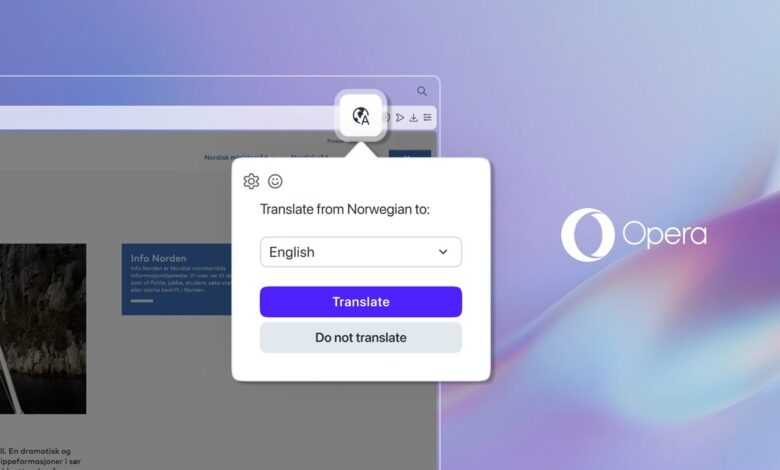
In its latest update, Opera has officially unveiled Opera Translate, a sleek, secure, and privacy-friendly translation tool built right into its desktop browsers—Opera One and Opera GX. The message is clear: Google Translate is no longer the only game in town.
A Browser That Speaks Your Language
Opera Translate kicks in the moment you land on a page written in a language you don’t understand. No more copying text and juggling between tabs like you’re defusing a bomb. Now, you’ll simply get a neat little prompt asking if you’d like the site translated. Click “Yes,” and voilà—your web experience is instantly more global.
Supporting over 40 languages, the tool works across news sites, shopping platforms, niche blogs—basically anywhere the internet takes you. And it’s powered by Lingvanex, the same AI-enhanced engine Opera has trusted for Android translations since 2023. Best part? Everything is processed on Opera’s European servers, meaning your data stays private and isn’t beamed to some mysterious third party.

“We’re giving our users access to content and ideas from across the globe without compromising their privacy,” said Tomasz Stawarz, Director of Product at Opera. Translation that just works—without leaking your data? That’s a 2025 win. But while Opera says the Translate tool can be accessed via the browser’s Settings > Features > Opera Translate, I couldn’t find it in my browser despite having the latest version.
With X swapping out Google Translate for Grok and Opera now flexing its own language muscles, the web is clearly entering a new era of AI localization independence. The trend? Platforms are building their own tools—custom, on-brand, and more tightly integrated—rather than leaning on Google’s ecosystem.
It’s a subtle but significant shift. First, it was search engines. Then, it was ads. Now, it’s translations. One by one, tech giants and indie browsers alike are cutting the cord.
There’s More in the Update
While Opera Translate steals the spotlight, the rest of the update isn’t just filler.
1. Split Screen Mode Gets Smarter (and Cooler)
Opera One now lets you use its Split Screen mode inside its beloved Tab Islands—Opera’s clever system for grouping tabs by context. Think of it as having dual monitors inside a single browser tab group. You can now split two tabs side-by-side and still move them around as a pair. Oh, and you finally get access to the full toolbar in Split Screen mode, including the music player and all your essentials.
2. Opera GX: Gamers, Meet Animated Cursors
Opera GX, the gaming-focused browser, just got even more extra. Thanks to a partnership with Sweezy Cursors, you can now choose from 30+ custom cursor packs, including animated ones. Whether you want pixel fireballs or glowing cyberpunk trails, it’s all one click away. And no, you don’t need sketchy extensions or OS hacks.
GX is also rolling out Tab Island enhancements like naming, color-coding, and saving entire tab groups as Speed Dials. The dream of organizing your chaos is finally real.
One Less Tab Open
The whole point of Opera Translate—and this update, really—is convenience. No more Google Translate tabs or extension. No more third-party cursor plugins. With each feature baked right into the browser and respecting your privacy, Opera is making a strong case for being more than just your backup browser.
So if you haven’t given Opera a spin since the days of dial-up, this might just be your sign. Update or download Opera One or GX today—and maybe, just maybe, you’ll fall in love with your browser again.



Join the discussion