

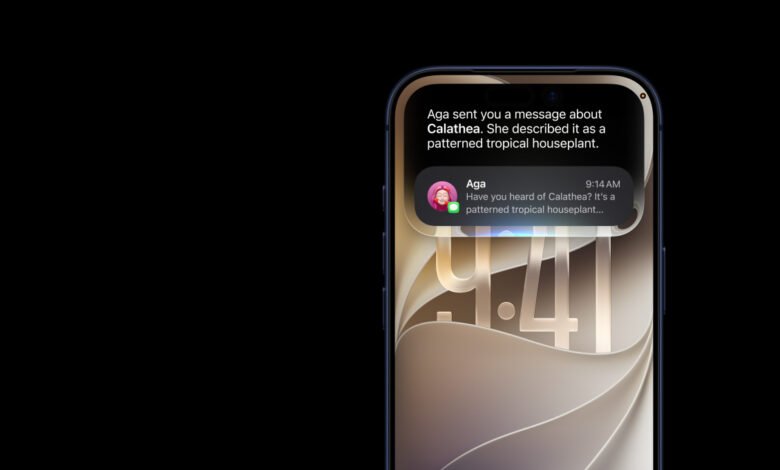
Apple released the first public beta of iOS 27 on Monday, 13 July. Marketing chief Greg Joswiak confirmed it on X, calling the new software “more responsive, reliable, and delightful.” Alongside it came public betas of iPadOS 27, macOS 27 Golden Gate, watchOS 27, tvOS 27 and visionOS 27.
If you have a compatible iPhone and an Apple ID, you can install it today. Whether you should is a separate question, and it depends on details Apple does not put on the download page.
First, what a public beta actually is
Apple builds each new version of iOS in stages. It announces the software at WWDC in June, then releases test versions through the summer, then ships the finished version to everyone in September.
Those test versions come in two flavours.

A developer beta is the raw build. It arrives first, it is meant for people who write apps and need to check their work still runs, and it tends to break things. We ran the developer beta ourselves, and beta 1 gave our iPhone 17 Pro Max a Wi-Fi problem that almost sent us back to iOS 26.
A public beta is the same software, a few rounds later, once the worst has been sanded off. It is free, it needs no developer account, and it is aimed at ordinary users willing to test in exchange for early access.
The one released on Monday is build 24A5380h. That is the exact same build as developer beta 3, which shipped on 6 July. So this is not a newer, safer version of iOS 27. It is the same code, opened to a much larger group of people. Apple’s logic is that a bigger testing pool finds more bugs before September.
The device list, in three tiers
This is where most coverage gets sloppy. “Supported” and “gets the good stuff” are not the same thing, and there are three separate lines, not one.
Tier one: phones that can install iOS 27. Every iPhone that runs iOS 26 runs iOS 27. That means iPhone 11 and everything after it, plus the iPhone SE (2nd generation, 2020) and iPhone SE (3rd generation, 2022). Apple did not drop a single device this year, which is unusual and worth noting if you are holding an older phone.
Tier two: phones that get Apple Intelligence and the new Siri AI. iPhone 15 Pro, iPhone 15 Pro Max, and every iPhone 16 model or later. That last phrase covers the iPhone 16e, the iPhone Air and the iPhone 17 series. Everything below that line installs iOS 27 and gets none of the AI.
Tier three: phones that get Apple’s most powerful on-device model. iPhone Air, iPhone 17 Pro and iPhone 17 Pro Max, and nothing else. This model needs 12GB of RAM, which is why even the standard iPhone 17 misses out. It is what powers the customisable, more expressive Siri voice and the large jump in dictation accuracy.
Read those tiers against what Kenyans actually carry. The iPhone 13 and iPhone 14 dominate the local secondhand market. Both install iOS 27 happily. Neither will ever see Siri AI. If the new assistant is the reason you were going to update, and you are on a 13 or a 14, the update will not give it to you, and no software patch later will change that.
The Siri waitlist, and the part nobody mentions
Having a supported phone is not enough. Siri AI sits behind a waitlist even on eligible hardware. You install iOS 27, open Settings, go to the Siri section, and join a queue. In our case, access took two weeks.
Two practical notes from our own testing, which you will not find in Apple’s documentation.
Set your device and Siri language to English (United States). Siri AI launches in English only, and Apple’s supported variants are English for Australia, Canada, Ireland, India, New Zealand, South Africa, the UK and the US. There is no English (Kenya) option, so US English is the clean choice and it works.
Then wait. Once Siri AI switches on, your phone has to index everything on it before the assistant can search your own messages, mail, notes and photos. That indexing is the entire point of the new Siri, and it is slow. Settings shows this as “Optimizing Search and Siri.” Until it clears, the assistant will feel underwhelming and you will assume it is broken. It is not. It is reading your phone.
What is genuinely new
Beyond Siri, the headline additions are a Photos app that can now remove larger distractions with Clean Up, generate scenery outside the edges of a shot with Extend, and change the apparent camera angle after the fact with Spatial Reframing. Safari can sort your tabs into topics on its own. The Liquid Glass design from iOS 26 stays, but you now get a transparency slider to dial it from near-invisible to heavily tinted. Screen Time gets a rebuilt set of parental controls, including a feature that makes children request permission before visiting new websites. Apple also claims broad speed improvements, including on older iPhones.
One correction to the global coverage. Several outlets are listing bill-splitting in the new Camera Siri mode as a marquee feature. Apple’s own footnote says that function runs on Apple Cash, which is available only in the United States. It will not work in Kenya.
The honest cost
There is no money involved. The cost is risk.
Beta software can breaks things. Expect battery drain, occasional heat, and third-party apps that misbehave or refuse to open at all. Banking apps and authenticator apps are among the most common casualties, because they are the most sensitive to system changes. However, all that said, this is the most stable beta I’ve ever used since I started using an iPhone with the iPhone 11 Pro Max.
So it is not recommended to install this on the phone that holds your M-PESA, your banking apps and your only authenticator. If that phone breaks, you are not debugging a gadget, you are locked out of your money.
A good caution if you go ahead nonetheless – like most of us have – back up everything before you do anything. And understand that going back is not simple. Rolling from an iOS 27 beta down to iOS 26 means connecting to a computer, putting the phone into recovery mode and wiping it, then restoring from a backup made on iOS 26. A backup made on iOS 27 will not restore onto iOS 26. MacRumors has a full downgrade walkthrough worth reading before you install, not after.
How to install it
Sign up free at beta.apple.com with the Apple ID you use on your phone. Back the phone up. Then open Settings, go to General, Software Update, Beta Updates, and pick iOS 27 Public Beta. Restart the phone if the option does not appear. The update then shows up on the normal Software Update screen.
There is no carrier gating and no regional staggering. Safaricom, Airtel and Telkom have no say in this. Siri AI is blocked in the EU and in China, but Kenya is not on either list.
So should you?
Install it if you have a spare iPhone, or if you are curious enough that a week of odd bugs sounds like a fair trade. On a second device, the new Photos tools and the speed improvements alone make it interesting.
Wait for September if the phone in question is the one you actually depend on. The finished version is coming this autumn, it will be free, and it will arrive on the same phone with none of the breakage. Nothing in this beta is worth losing access to your bank for a fortnight.
And if you are reading this on Android, the equivalent question is being answered separately in our Samsung One UI 9 and Android 17 update tracker, which we update as each Galaxy device joins the queue.
iOS 27 is the software Apple is building for the phones it launches in September. We have collected every credible iPhone 18 Pro leak so far, and a wider look at the iPhone Ultra, iPhone 18 Pro and Pro Max. On the AI that powers the new Siri, the backstory is messier than Apple lets on, as we covered when Apple sued OpenAI over trade secrets last week.





Join the discussion